
How-to
How to Prepare for Remote Interviews? A Friendly Guide

In recent years, many employers have shifted most of their recruitment processes to virtual methods out of preference and practicality. Previously, only about half of employers were comfortable using phone and video interviews to select candidates. Today, organizations across industries rely heavily on these digital approaches to identify and hire talent, and this shift is expected to remain a long-term part of modern recruitment.
A majority of interviews are conducted using video (Zoom, Skype, Microsoft Teams), with phone interviews still being used to pre-screen candidates.
For employers, an initial phone pre-secreening call is a great way to quickly filter through a large number of initially shortlisted CV’s, or to clarify any pointers or address any immediate questions about an applicants’ suitability.
Unfortunately, many job seekers don’t always take them seriously and their approach to a phone interview can be rather nonchalant.
Phone vs Video Interview:
Given the choice of attending a face to face meeting using video call and being available for a phone interview with an employer, job seekers would usually give more commitment to the companies that invited them in to meet them via video call.
If you are ever asked to attend a phone interview, think twice before you presume or doubt the commitment of what could be your next future employer. Although it is always preferable to meet face to face for a first round interview, phone interviews can be advantageous to you. They might save you time if you have a busy work schedule and enable you to get an initial feel for the company and if it is the right fit for you.
Nowadays phone interviews are mostly used to pre-screen applicants before inviting them for a face to face (virtual) meeting. They will give you the chance to demonstrate your suitability and also allow you to ask as many questions as possible about the role and company you are courting. But bear in mind phone interviews are not always brief as some employers still prefer using phone interviews to conduct an in depth assessment. It is therefore much better to be prepared for both. So how do you ensure you get the best outcome from your interview? here are some tips to prepare for remote interviews:
| Also Read: Why More Than 80% of CVs Are Only Fit for the Dustbin? |
| Also Read: 5 Simple Job-Hunting Tips for Fresh Graduates |

How to Prepare for Remote Interviews?
1. Research the Company:
This means look at the website, news articles, information from the recruitment consultant, social media updates, blogs and make sure you understand what they do, or if anything interesting catches your eye about what they do.
What is happening in the business, can you find any information from employees about working there? Is there anything specifically they have won awards in?
What reviews do you see about them on Google?
Look at the job description.
What are the skills they are looking for?
Do you understand the role?
Can you provide examples of where you have applied those skills?
What do you like about the sound of the role?
Consider who is conducting the phone interview.
Is it the Line manager? If this is the case you will be able to find out more about the day to day role and culture or team.
Is it the HR consultant? They generally have a slightly different angle when interviewing as they’ll often focus on your overall fit for the role and company, and they may not be able to talk so much about the details of day-to-day responsibilities that you will have.
Have you checked their LinkedIn profile? You may come across some interesting articles and updates about them and their work.
2. Choose the Right Setting:
Find a quiet space and set the right background. Find out how long the interview will be and make sure there are as few distractions as possible (admittedly hard sometimes if you are working from home with family/flatmates present). The right setting will enable you to focus more clearly on the actual interview and the background you select can offer a lot of information about your personality without you realising it.
3. Prepare Your Questions:
Prepare for questions they may ask, and prepare questions to ask depending on who is doing the interviewing.
What do you like about the role? What are you looking for? Does this match what they offer? Why do you want to leave your current job?
Ask the interviewer questions about the team, the company, why the role became available, what they are looking for, and if applicable, what the clients you would work with are like. Don’t just ask about money and working hours (never in a first interview) but show you are interested in them, what they are looking for, why they are hiring, what challenges (good ones) the role might offer you.
Don’t be afraid of asking questions you would ask in a face-to-face interview; it’s your interview too and you should be allowed the opportunity to ask at least one or two questions. If you are afraid of asking salary question, then here is the article where we wrote about the best way to approach the salary question during an interview.
| Also Read: 10 Best Remote Jobs You Can Do While on Vacation |
| Also Read: 12 IT Jobs That Don’t Require Coding Skills |
4. Present Yourself Effectively:
Talking on the phone or over video is never as intimate as in person meetings, so it is important you make an added effort to get your personality across. Sit in a good comfortable chair as your posture will affect how you speak. Make good eye contact so you are looking at the interviewer and not down or away from the camera. Use your tone to convey enthusiasm, and be aware of your facial expressions. They are a large part of your message online. Silence any notification noises which could cause distractions such as emails, messages, your phone ringing through your laptop.
5. End the Interview:
Let them know what you think about the role and the company at the end of an interview. If you are keen, ask them what the next stage is in the process. Ask them if they have any reservations about your application and if they do, respond to them. This may be your only chance to address this.
Remote interviews are more easily accessible and take away the added effort of travelling to a destination to meet in person, however it is important to remember that be it an initial phone call or a conversation over Zoom, decisions are now being made without ever having to meet face to face. This means you have to ensure that they see you as the right person for the job without ever actually meeting you. So bring your A game so they can remotely see that you are the best person for the job!
Author Note:
Thank you for taking the time to read this article! If you found it informative or enjoyable, why not share it with others? Your support helps spread knowledge.

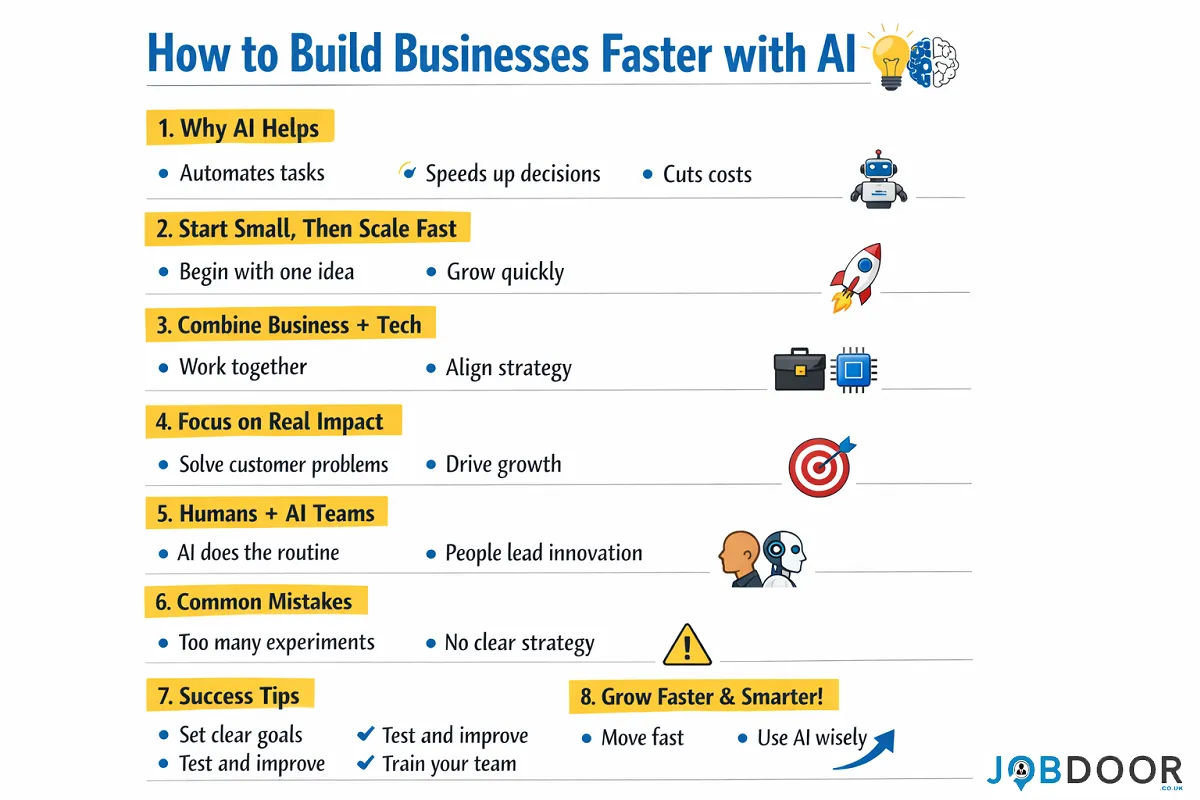
1. What is the main idea?
The article explains that AI (Artificial Intelligence) can help companies build new businesses much faster, cheaper, and smarter than before.
Earlier, starting a new business took a lot of time, money, and effort.
Now, AI is changing that.
2. Why AI makes business building faster?
AI helps in many ways:
- It automates routine work (like research, customer support, data analysis)
- It helps teams make better decisions quickly
- It reduces the need for large teams and long processes
Because of this, companies can:
- Launch products faster
- Test ideas quickly
- Fix problems early
3. What successful companies do differently?
The article says top companies don’t just “use AI tools.”
They change how they build businesses completely.
They focus on:
a) Start small, then grow fast
- Don’t try to change everything at once
- Pick one idea or area
- Build it quickly using AI
- Then expand
This approach works better than big, slow projects.
b) Combine business + technology thinking
- Business teams and tech teams must work together
- Leaders should understand both business problems and AI possibilities
c) Focus on real value (not just experiments)
Many companies fail because they:
- Try random AI experiments
- Don’t focus on actual business impact
Successful companies:
- Use AI to solve real customer problems
- Focus on revenue, growth, and efficiency
4. AI changes how companies are built:
Earlier:
- People did most work
- Processes were slow and manual
Now:
- Humans + AI work together
- AI handles repetitive tasks
- Humans focus on creativity and decisions
This creates a new type of organization, where AI becomes part of everyday work.
5. Key benefits of using AI in business building
AI helps companies:
- Build businesses faster
- Spend less money
- Scale operations easily
- Improve customer experience
- Make smarter decisions
Some AI-driven businesses even grow much faster than traditional ones.
6. Common mistakes companies make:
The article warns about a few problems:
- Using AI without a clear plan
- Running too many small experiments without results
- Not training leaders and teams properly
- Treating AI as a tool instead of a strategy
👉 Just using AI tools is not enough —
you must change how the business works.
7. What companies should do:
To succeed with AI:
- Start with a clear goal
- Use AI in important areas first
- Build small, test fast, improve quickly
- Train leaders and teams in AI
- Focus on real business results
8. Final takeaway:
AI is not just a technology upgrade.
It is a new way of building businesses.
Companies that:
- Move fast
- Learn quickly
- Use AI wisely

Have you ever wondered how some YouTube channels grow incredibly fast without ever showing a face on camera? You see dramatic storytelling videos, cinematic clips, and mysterious narratives that attract millions of views. It might feel confusing at first.
“How are they making these videos?”
“Do they need expensive equipment?”
“Do they need acting skills or video production experience?”
The truth is—you don’t need any of those things anymore.
With powerful AI video generation tools like SORA 2, anyone can create high-quality cinematic videos without filming anything in the real world. That means no camera, no actors, and no studio.
This guide will walk you through everything from mindset to strategy to execution so you can confidently start creating viral faceless YouTube videos.
By the end of this article, you will learn:
- What SORA 2 actually does
- Why faceless YouTube channels are exploding
- How to pick profitable video ideas
- A step-by-step workflow to create videos
- How to track performance and grow your channel
Even if you’re a complete beginner, this guide will help you build a clear system that removes confusion and anxiety.
Let’s start.
Why Faceless YouTube Channels Are Growing So Fast?
Before we talk about SORA 2, let’s understand something important.
Faceless channels are not a trend.
They are a content model.
A faceless YouTube channel simply means:
The creator never appears on camera.
Instead, the video uses:
- AI visuals
- Storytelling scenes
- Narration
- Text overlays
- cinematic clips
This format has several advantages.
1. Anyone Can Do It
You don’t need to be confident on camera.
You don’t need to worry about lighting, makeup, or filming locations.
All you need is ideas and creativity.
2. Videos Are Faster to Produce
Traditional video production involves:
- filming
- retakes
- editing
- lighting adjustments
With AI-generated scenes, you can create visuals in minutes instead of hours.
3. Infinite Story Possibilities
AI allows you to generate scenes that are impossible to film easily.
For example:
- mysterious forests
- cinematic crime scenes
- dramatic survival stories
- historical recreations
That’s why AI faceless channels often feel more cinematic than regular videos.
What Is SORA 2 and Why It’s Powerful?
SORA 2 is an advanced AI video generation technology that creates cinematic scenes from text descriptions.
You simply describe a scene, and the AI generates video footage.
For example:
“A lone traveler walking through a foggy forest at night holding a lantern.”
The AI can generate that scene visually.
This changes the entire game for content creators.
Instead of filming in real locations, you can generate entire video stories with AI visuals.
Key Advantages of SORA 2:
- Cinematic video generation
- realistic lighting and motion
- storytelling scenes
- no filming required
- unlimited creative environments
This means your videos can look like movie scenes, even if you’re just starting.
Step 1: The Mindset for Success (Most People Skip This)
Before we talk about tools and workflows, we need to address mindset.
Many beginners fail because they think:
- “I need to be perfect.”
- “I need professional editing.”
- “I need expensive software.”
You don’t.
You only need consistency and storytelling.
Think about YouTube like planting seeds.
You upload videos.
Some grow slowly.
Some suddenly explode.
Your job is simply to plant enough seeds.
So remember:
Your first videos are practice.
The goal is progress, not perfection.
Step 2: Choose the Right Faceless Video Niche
Your niche determines your success.
Some niches perform extremely well with AI storytelling.
Here are powerful niches that work perfectly with AI-generated scenes.
1. Mystery and Crime Stories:
People love suspense.
Examples include:
- unsolved mysteries
- crime storytelling
- dark urban legends
AI can generate dramatic visuals like:
- dark alleys
- police scenes
- mysterious figures
These videos often go viral because viewers stay curious until the end.
2. Survival and Adventure Stories:
Adventure content works extremely well with cinematic AI scenes.
Examples:
- survival in the wilderness
- solo camping stories
- extreme adventure storytelling
Scenes like:
- foggy forests
- campfires
- dangerous wildlife encounters
create immersive storytelling.
3. Historical Stories:
History channels are exploding on YouTube.
Examples:
- ancient civilizations
- historical battles
- famous historical mysteries
AI-generated scenes can recreate environments like:
- ancient cities
- battlefields
- royal palaces
which would normally require huge production budgets.
4. Sci-Fi and Futuristic Stories:
Science fiction is perfect for AI-generated visuals.
Examples:
- AI futures
- space exploration stories
- futuristic cities
AI can generate visuals that look like movie scenes.
Step 3: Creating Video Ideas That Attract Clicks
Before creating visuals, you must design the idea.
Great YouTube videos follow a simple formula:
Curiosity + Emotion + Story
Examples:
- “The Man Who Survived Alone in the Forest for 100 Days”
- “The Creepiest Unsolved Mystery in America”
- “What Happens If Humans Disappear Tomorrow?”
Ask yourself:
Would I click this video?
If the answer is yes, the idea works.
Step 4: Generating Cinematic Scenes with SORA 2
Once you have an idea, you can begin generating scenes.
The key is writing clear visual prompts.
Instead of writing vague prompts, describe the scene like a movie director.
Example Prompt
Bad prompt:
“Man walking in forest”
Better prompt:
“Cinematic scene of a lone hiker walking through a foggy forest at dawn carrying a lantern, dramatic lighting, cinematic atmosphere.”
The better your description, the better your video scenes.
Pro Tip
Generate multiple scenes for each story moment.
This helps create visual variety in the video.
Step 5: Structure Your Video Like a Story
A viral video is not random clips.
It’s a story journey.
Use this simple storytelling structure.
1. The Hook (First 10 Seconds):
Grab attention immediately.
Example:
“This man entered the forest alone… but something was already watching him.”
Viewers should feel curious instantly.
2. The Build-Up:
Introduce the situation.
Explain the background.
Slowly increase tension.
3. The Twist:
Every viral story has a moment where something unexpected happens.
Example:
- strange sound
- mysterious discovery
- unexpected danger
This keeps viewers watching.
4. The Resolution:
End the story with a satisfying conclusion.
This helps viewers remember your channel.
Step 6: Add Voice Narration
Narration brings life to faceless videos.
The tone should match the story.
For mystery videos:
- slow
- calm
- suspenseful
For adventure stories:
- energetic
- immersive
Short sentences help build tension.
Example:
“At first… everything seemed normal.”
“But then he heard it.”
“A sound coming from deep in the forest.”
That rhythm keeps viewers engaged.
Step 7: Designing a Viral Thumbnail
Your thumbnail is the first impression.
Even the best video fails without a good thumbnail.
Great thumbnails include:
- strong emotion
- dramatic visuals
- minimal text
Examples:
- shocked face expression
- mysterious animal
- dramatic lighting
Keep text short.
Example:
“SORA 2 Secrets”
or
“AI Videos That Go Viral”
Step 8: Writing Titles That Trigger Curiosity
Titles must make viewers curious.
Good titles create a question in the viewer’s mind.
Examples:
- “How I Use SORA 2 to Create Viral Faceless Videos”
- “The Secret Behind AI Viral Videos”
- “This AI Tool Can Make YouTube Videos for You”
Avoid boring titles like:
“AI Video Tutorial”
Instead create intrigue.
Step 9: Upload Strategy for Growth
Consistency matters more than perfection.
A good beginner schedule is:
- 2 videos per week
This gives the algorithm enough content to analyze.
Think of YouTube like training data.
The more videos you publish, the more YouTube understands your audience.
Step 10: Track Your Success (Simple Metrics)
Many beginners overcomplicate analytics.
Focus on only three metrics.
| Metric | Why It Matters |
|---|---|
| Click-Through Rate | Shows if your thumbnail works |
| Average View Duration | Shows if your story keeps attention |
| Subscriber Growth | Shows if people trust your content |
If viewers leave early, improve the hook.
If nobody clicks, improve the thumbnail.
Small adjustments lead to big growth.
Common Beginner Mistakes to Avoid:
Here are mistakes that slow down new creators.
Overcomplicating Production:
Remember:
Simple stories work.
Don’t aim for Hollywood.
Aim for consistent storytelling.
Uploading Too Slowly:
Growth comes from volume.
Uploading one video every two months will slow momentum.
Ignoring Thumbnails:
Even a great video fails without clicks.
Your thumbnail deserves serious attention.
The Future of AI Video Creation:
We are entering a new era of content creation.
AI video generation allows creators to build cinematic stories without studios, actors, or equipment.
This means the barrier to entry is disappearing.
What matters now is:
- creativity
- storytelling
- consistency
Those who start early will gain a massive advantage.
Conclusion:
Creating viral faceless YouTube videos might seem complicated at first.
But when you break it down, the process is surprisingly simple.
You only need a clear system.
Remember the key steps:
- Choose a strong niche
- Create curiosity-driven ideas
- Generate cinematic scenes with SORA 2
- Structure videos as stories
- Design clickable thumbnails
- Track simple metrics
Most importantly, don’t wait for perfection.
Your first video will teach you more than reading ten tutorials.
Your second video will be better.
Your tenth video might go viral.
The creators who succeed are not the most talented.
They are simply the ones who start and keep going.
So open your notebook.
Write your first video idea.
And begin creating today.

Saying goodbye at work is never easy. One day you’re sharing coffee breaks, deadlines, and inside jokes — and the next day, a colleague is packing their desk and moving on. You want to say something meaningful. But what?
Many people feel awkward writing a goodbye email to a colleague. Should it be formal or friendly? Short or detailed? Emotional or professional? The uncertainty can create stress, especially if you’re not naturally expressive with words.
Here’s the good news: writing a thoughtful farewell message doesn’t need to be complicated. You don’t need to be a poet. You just need sincerity, clarity, and the right structure.
This guide will walk you through everything — from understanding the purpose of a goodbye email to step-by-step writing formulas, real examples, subject lines, and mistakes to avoid. By the end, you’ll know exactly what to say when a coworker is leaving, and you’ll feel confident hitting “send” without second-guessing yourself.
Let’s begin.
Why a Goodbye Email Matters More Than You Think?
A farewell message may seem small, but it carries emotional and professional value.
1. It strengthens relationships
Workplaces change. Careers evolve. But strong connections remain. A simple goodbye email keeps doors open for future collaboration.
2. It shows appreciation
People want to feel valued. A few genuine words can validate years of teamwork.
3. It preserves professional reputation
How you communicate during transitions reflects your emotional intelligence and professionalism.
4. It provides closure
Whether the departure is happy or bittersweet, a goodbye message helps everyone move forward with positivity.
Think about it — have you ever received a heartfelt farewell message that stayed with you? That’s the impact you’re creating.
When Should You Send a Goodbye Email?
Timing matters. Sending too early feels awkward. Too late feels rushed.
Best moments to send:
- On the colleague’s last working day
- A day before departure
- After a farewell meeting or announcement
Avoid sending:
- Immediately after hearing the news (unless you’re very close)
- Long after they’ve already left
The goal is simple: be timely, not rushed.
How to Write a Goodbye Email to a Colleague?
Let’s remove the guesswork. Use this easy framework.
Step 1: Start with a warm greeting
Keep it natural.
Examples:
- Hi Sarah,
- Dear John,
- Hello Team, (for group messages)
Step 2: Acknowledge their departure
Be clear and positive.
Example:
- I was surprised to hear you’re moving on, but I’m excited about your next chapter.
Step 3: Express appreciation
This is the heart of your message.
Think about:
- What you learned from them
- Projects you worked on together
- Personal qualities you admire
Step 4: Share a personal memory (optional but powerful)
Specific memories feel genuine.
Example:
- I’ll always remember our late-night deadline crunches and how you kept everyone calm.
Step 5: Offer good wishes
Keep it optimistic.
Examples:
- Wishing you success in your new role
- I know you’ll do amazing things ahead
Step 6: End with a connection invitation
Leave the relationship open.
Example:
- Let’s stay in touch
- Hope our paths cross again
Simple Formula You Can Always Follow:
If you ever feel stuck, use this structure:
Greeting → Acknowledge → Appreciate → Personal note → Good wishes → Stay connected
That’s it. Simple. Effective. Memorable.
Examples of Goodbye Emails for Different Situations:
1. Short and Professional Goodbye Email:
Hi Alex,
It was a pleasure working with you. Your dedication and positive attitude made every project smoother. Wishing you all the best in your new journey — your next team is lucky to have you.
Let’s stay in touch.
Best regards,
[Your Name]
2. Friendly and Warm Farewell Message:
Hey Peter,
I can’t believe you’re leaving! Working with you has been one of the best parts of my time here. Your energy, creativity, and endless support made even stressful days enjoyable.
I’m excited to see what you accomplish next. Keep shining — and don’t forget us!
Stay in touch 😊
3. Goodbye Email to Manager:
Dear Rachel,
Thank you for your leadership and guidance. I’ve learned valuable lessons from your approach to teamwork and problem-solving. Your mentorship truly shaped my growth here.
Wishing you continued success and happiness in your new role.
Warm regards,
[Your Name]
4. Group Farewell Email to Team Member:
Hi Team,
As we say goodbye to Annie, I just want to acknowledge how much she contributed to our team. Her dedication, reliability, and kindness made a real difference.
Wishing her success and happiness in everything ahead.
Subject Line Ideas That Work:
Your subject line sets the tone.
Try these:
- Best wishes on your next adventure
- Farewell and good luck
- Thank you and goodbye
- Wishing you success ahead
- You’ll be missed
Keep it clear and warm — not dramatic.
Common Mistakes to Avoid:
Even good intentions can go wrong. Watch out for these.
1. Being overly emotional
A workplace farewell isn’t a movie script. Keep sincerity balanced with professionalism.
2. Writing generic messages
“Good luck” alone feels forgettable. Add at least one personal touch.
3. Making it about yourself
The focus should be on them — not your sadness.
4. Mentioning negative experiences
A farewell email is not the place for unresolved issues.
5. Writing too long
A heartfelt message doesn’t need paragraphs of detail. Keep it meaningful and concise.
How to Make Your Goodbye Email Feel Genuine?
Authenticity is what people remember.
Tips to sound natural:
- Write like you speak
- Use simple words
- Mention one real experience
- Avoid corporate clichés
Ask yourself: Would I say this to them in person?
If yes — you’re on the right track.
What If You Didn’t Know the Colleague Well?
It happens. Not every coworker becomes a close friend.
Keep it polite and appreciative.
Example:
Hi Daniel,
While we didn’t work closely, I appreciated your professionalism and positive presence in the team. Wishing you success and fulfillment in your next role.
Best wishes,
[Your Name]
Simple. Respectful. Enough.
Goodbye Email vs. Farewell Message — What’s the Difference?
| Goodbye Email | Farewell Message |
|---|---|
| More structured | Casual and brief |
| Sent via email | Can be chat, card, or text |
| Professional tone | Often friendly tone |
| Longer format | Short and quick |
Both are valuable. Choose based on your relationship.
Should You Add Humor?
Yes — but carefully.
Humor works if:
- You have a friendly relationship
- It reflects shared memories
- It remains respectful
Avoid sarcasm or jokes that could be misunderstood.
How to Stay Connected After a Coworker Leaves?
A goodbye email can be the start of a long-term professional connection.
Ways to stay connected:
- LinkedIn connection request
- Occasional check-in message
- Celebrating their milestones
- Networking collaboration
Remember: careers are long. Relationships matter.
Special Situations: What to Say
When the departure is sudden
Focus on appreciation and support.
When they’re retiring
Celebrate achievements and legacy.
When they’re changing careers
Encourage their courage and growth.
When you feel sad
It’s okay to acknowledge emotions — briefly and positively.
Quick Checklist Before Sending:
✔ Is your message clear and warm?
✔ Did you mention appreciation?
✔ Is the tone respectful?
✔ Did you keep it concise?
✔ Would you feel good receiving this message?
If yes — send it confidently.
Conclusion:
Workplace goodbyes are emotional, but they’re also opportunities — opportunities to express gratitude, strengthen relationships, and leave a lasting positive impression.
A thoughtful goodbye email to a colleague or coworker doesn’t require perfect writing skills. It simply requires sincerity, clarity, and a touch of kindness. By following the simple structure in this guide — greeting, acknowledgment, appreciation, personal note, and good wishes — you can create a message that feels genuine and memorable.
Remember, people may forget projects and deadlines, but they rarely forget how someone made them feel. Your farewell message could be the encouragement they carry into their next chapter.
So don’t overthink it. Start today. Write from the heart. Send that email.
You might be giving someone the perfect ending — and an even better beginning.

How to Build Businesses Faster with AI?
1. What is the main idea? The article explains that AI (Artificial Intelligence) can help companies build new businesses much...

Majority of Americans Believe AI Will Cause More Harm Than Good
A recent survey by Quinnipiac University shows that many people in the United States are worried about artificial intelligence (AI)....

5 AI Tools for HR Professionals: Simplify Hiring & Management
Human Resources has always been about people. But today, HR professionals are expected to manage recruitment, employee engagement, performance tracking,...


How to Make Viral AI Solo Camping ASMR Videos?
Creating AI solo camping ASMR videos has become one of the fastest-growing content niches on YouTube and short-form platforms. Videos...

7 AI Tools Every Software Engineer Should Learn Before 2026
Artificial Intelligence is no longer a futuristic concept. It is already transforming how software is built, tested, and deployed. If...


How to Use SORA 2 to Create Viral Faceless YouTube Videos?
Have you ever wondered how some YouTube channels grow incredibly fast without ever showing a face on camera? You see...


Companies Pay $10K for This AI Masterclass: Learn the Skills That Are Reshaping the Future
Companies don’t pay for tools. They pay for systems, strategy, and transformation. A high-end AI masterclass teaches employees how to...


AI for Kids: The Fun and Easy Way to Understand Artificial Intelligence
Artificial Intelligence sounds like something from a science-fiction movie. Robots. Smart computers. Machines that think like humans. For many people,...


10 AI Myths and Facts Most People Still Believe (And the Truth Behind Them)
Artificial Intelligence is everywhere right now. You hear about it in the news. You see it in social media discussions....

5 Simple Things Successful People Do Before 8 AM
Have you ever wondered why some people seem to start their day full of energy, focus, and confidence? While others...

Best YouTube Channels to Learn Tech Skills for Free
Learning technology skills today is easier than ever. You don’t need expensive courses or a computer science degree anymore. YouTube...

12 Underrated Apps To Learn Something New Every Day
Let’s be honest. Most of us spend 3–5 hours a day on our phones. Scrolling social media. Watching random videos....


Google Launches Gemini 3.1 Pro: A Big Step Forward in Artificial Intelligence
Google has officially introduced Gemini 3.1 Pro, its newest and most powerful artificial intelligence model. This launch is part of...


How to Create Unlimited AI Videos in One Click for Free (2026 Guide)
Artificial Intelligence is changing how we create content online. Today, you don’t need expensive software, video editing skills, or hours...


How to Make AI Survival ASMR Videos in 2026: New Viral YouTube Niche
YouTube trends change very quickly. Every few months, a new content style appears and suddenly thousands of creators start using...


How to Run Meta Ads on a Small Budget ($100/Day Strategy That Actually Works)
Most businesses believe you need a huge advertising budget to get results from Meta Ads. That’s simply not true. In...


5 Free Facebook AI Tools to Solve 90% of Your Ad Problems
Running Facebook ads used to mean endless guesswork. You would test audiences manually, duplicate ad sets endlessly, refresh creatives every...

How to Automate Meta Ads Using Manus AI?
Meta Ads are evolving faster than ever. Manual optimization, endless A/B testing, creative fatigue, reporting stress — all of it...


How to Build Automated Online Income in 2026 – The “Sleepy” Side Hustle Blueprint
“Stop ignoring this.”“Boost your income.”“Get paid while you sleep.” You’ve seen headlines like that everywhere. Screenshots of large payouts. Smiling...


How to Sell on Amazon FBA in 2026: The Complete, Future-Proof Blueprint for Beginners & Growth Sellers
Amazon FBA (Fulfillment by Amazon) is no longer just a side-hustle trend. It’s a sophisticated eCommerce ecosystem where brand building,...
-
 Career2 years ago
Career Opportunities for Seniors: 7 Jobs that are Perfect for Older Adults
-

 Career1 year ago
5 Free Job Posting Sites in the UK (For Employers)
-
 Money2 months ago
26 Lucrative Passive Income Ideas to Build Wealth in 2026
-
 Job Description2 years ago
Graphic Designer Job Description: Education, Salary, Skills, Work Hours
-
 Jobs2 months ago
15 Best Second Jobs to Boost Your Income in the UK for 2026
-
 News1 year ago
UK Government Offers £300 to Households: How to Claim Your Payment?
-

 AI & Tools2 months ago
ChatGPT vs Copilot: Which AI Is Best for You in 2026?
-

 Career2 years ago
13 Best Jobs That AI Can’t Replace: A Guide to Future-proof Careers