
AI & Tools
AI Myths and Facts: What Workers and Job Seekers Should Know
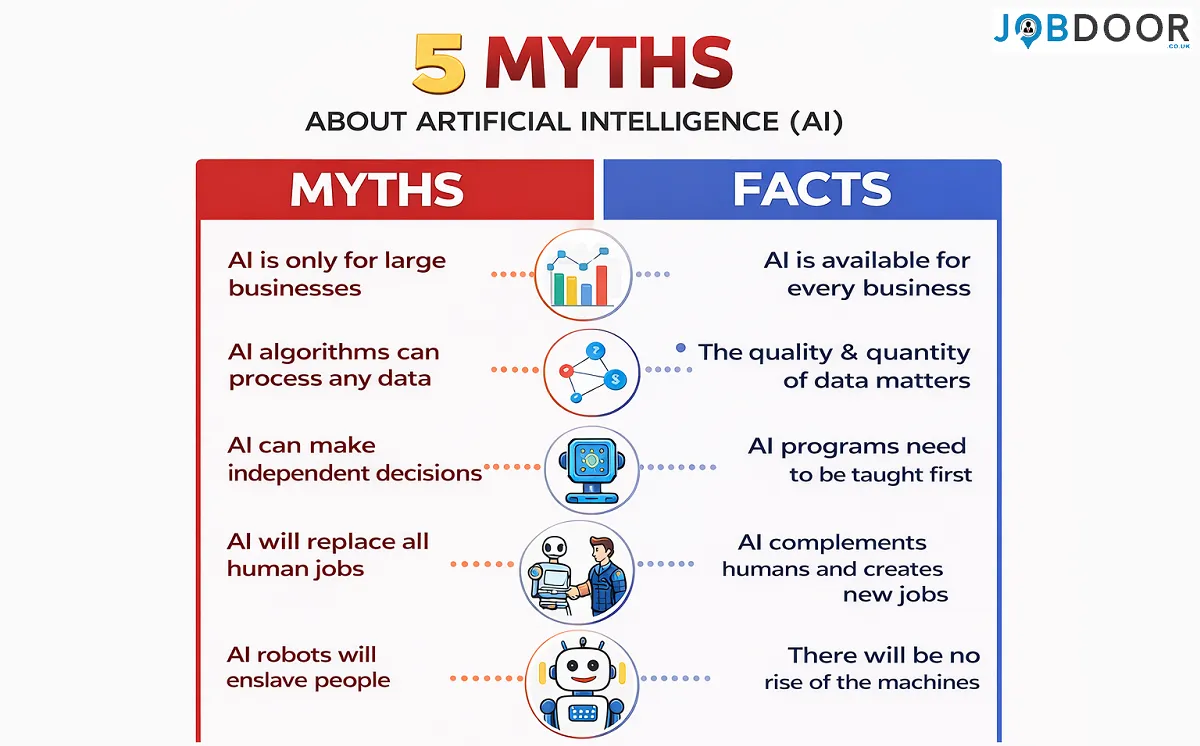
Artificial intelligence is changing how people work, search for jobs and build careers. At the same time, AI myths spread quickly. Some make the technology sound far more powerful than it is, while others create unnecessary fear.
For workers and job seekers, the useful question is not whether every headline about AI is true. It is what AI can actually do, where it has limits and how those changes affect work.
This guide separates common AI myths from practical facts, with a focus on jobs, workplace skills, recruitment and everyday use.
AI Myths and Facts at a Glance
| AI myth | What the facts suggest |
|---|---|
| AI will replace every human job | AI can automate or assist tasks, while jobs contain many activities that still require people. |
| AI always gives correct answers | AI can produce inaccurate, incomplete or misleading information. |
| You need to be a programmer to use AI | Many workplace AI tools can be used without coding. |
| More AI tools always mean more productivity | A small number of well-designed workflows can be more useful than a large collection of tools. |
| AI-written applications are automatically better | Generic or inaccurate AI output can weaken an application. |
| AI can make decisions for you | AI can support analysis, but people remain responsible for important decisions. |
Myth 1: AI Will Replace Every Human Job
This is one of the biggest fears surrounding artificial intelligence.
The fact
AI can automate parts of jobs, but that is different from eliminating every job in an occupation. Many roles combine routine tasks with communication, judgement, problem-solving, relationship building and responsibility.
The effect of AI therefore depends on the tasks involved, the technology available and how an employer changes its workflow.
For workers, the practical response is to understand which parts of their role can be assisted and strengthen skills that remain valuable.
Read more in AI and entry-level jobs in the UK.
Myth 2: AI Is Smarter Than Humans at Everything
AI can perform some tasks extremely quickly, including pattern recognition, text generation and information processing.
The fact
AI does not have the same broad real-world understanding, personal experience or accountability as a person. A system can produce a confident answer without actually understanding the situation in the way a human does.
That is why strong AI use combines machine assistance with human judgement.
Myth 3: AI Always Gives Correct Answers
A polished response can look convincing even when it contains an error.
The fact
AI systems can produce incorrect facts, weak reasoning, missing context and outdated information. The risk becomes more important when the answer affects money, employment, legal matters, safety or other high-impact decisions.
A simple rule is useful: the more important the decision, the more carefully you should verify the information.
Myth 4: You Need Coding Skills to Use AI
Programming is important for building AI systems, but using AI at work is a different skill.
The fact
People in marketing, administration, sales, HR, customer service, research and other fields can use AI for tasks such as drafting, summarising, organising information and generating ideas without writing code.
Basic AI literacy is becoming useful across many types of work.
See AI skills for job seekers for practical examples.
Myth 5: AI Is Only Useful for Large Technology Companies
AI is often associated with major technology businesses, but its workplace uses are much broader.
The fact
Small businesses, freelancers and individual workers can use AI to reduce repetitive work, organise information, prepare drafts and support customer or marketing workflows.
The important question is not whether a company is large enough for AI. It is whether a particular task has a useful and controlled AI application.
Myth 6: Using More AI Tools Makes You More Productive
It is easy to collect AI tools without improving your actual work.
The fact
Productivity comes from improving the workflow, not from having the largest tool collection.
For example, a worker may need one writing assistant, one research workflow and one approved workplace system rather than ten overlapping applications.
Start with a repetitive task, measure the time it takes, test one AI workflow and keep it only if the overall process improves.
Related: how to use AI efficiently at work.
Myth 7: AI Will Automatically Make Your CV Better
AI can improve grammar, structure and clarity, but better wording does not automatically create a stronger CV.
The fact
A good CV still needs accurate experience, relevant skills, measurable achievements and evidence that connects your background to the role.
AI should help you present genuine experience more clearly. It should never invent qualifications, responsibilities or results.
See how AI can help with CV writing without making it generic.
Myth 8: AI-Generated Job Applications Are Always Better
Generating an application in seconds can feel efficient, but speed is not the same as quality.
The fact
Recruiters may receive many applications containing similar generic language. An application becomes stronger when it reflects the candidate’s real experience and explains why that experience is relevant.
Use AI for research, structure and editing, then make sure the final application genuinely represents you.
For more guidance, see how to use AI responsibly when applying for jobs.
Myth 9: AI Can Decide Whether You Are Right for a Job
Recruitment technology can help employers process applications, organise candidate information and support parts of the hiring process.
The fact
AI is one possible part of a wider recruitment process. Employers use different systems, rules and levels of human review. It is therefore too simplistic to assume that every rejection was made by an AI system.
Job seekers should focus on submitting clear, accurate and relevant applications rather than trying to guess exactly how an employer’s technology works.
See how AI is changing recruitment.
Myth 10: AI Can Replace Human Creativity and Judgement
AI can generate text, images, ideas and possible solutions. That can make creative work faster.
The fact
Creative and professional work often involves choosing what matters, understanding people, recognising context and taking responsibility for the final result.
AI can generate options. A person still needs to decide which option fits the audience, purpose and real-world situation.
Myth 11: AI Skills Are Only for AI Jobs
You do not need to become an AI engineer to benefit from AI literacy.
The fact
Understanding how to write useful instructions, check AI output, protect information and fit AI into a workflow can complement many existing careers.
| Career area | Possible AI-related skill |
|---|---|
| Marketing | Content planning, research and campaign analysis |
| HR | Job description drafting and information organisation |
| Sales | Research, summaries and follow-up preparation |
| Administration | Document processing and repetitive communication |
| Customer service | Response drafting and knowledge support |
| Research | Document comparison and information organisation |
Myth 12: AI Means You No Longer Need to Think
This may be the most dangerous workplace misconception.
The fact
The more responsibility a task carries, the more valuable critical thinking becomes. AI can suggest an answer, but you still need to ask whether the answer makes sense.
A useful AI workflow is:
- Define the problem.
- Give AI the relevant context.
- Ask for possible answers or approaches.
- Challenge the result.
- Verify important information.
- Make the final decision.
How Workers Can Separate AI Hype From Reality
When you see a dramatic claim about AI, ask five simple questions:
- What task is actually being automated?
- Is the claim about a task, a job or an entire occupation?
- What evidence supports the claim?
- What human work is still required?
- What changes should I realistically prepare for?
This approach is more useful than reacting to every prediction about the future of work.
What AI Myths Mean for Job Seekers
Job seekers do not need to become experts in every new AI system. A better goal is to develop practical AI literacy alongside strong career skills.
- Understand the basics of AI-assisted work.
- Use AI to improve efficiency without misrepresenting your experience.
- Build strong communication and problem-solving skills.
- Keep evidence of your real achievements.
- Practise explaining how you use technology responsibly.
- Stay adaptable as workplace tools change.
What Businesses Should Remember
Businesses can also fall for AI myths. Buying an AI tool does not automatically create productivity gains.
A sensible approach is to identify a genuine business problem, measure the current process, test a small workflow, protect sensitive information, train employees and measure the result.
The goal should be better work, not simply more automation.
Frequently Asked Questions
Will AI replace most jobs?
AI is likely to change many tasks and workflows, but the effect varies by occupation. A job usually contains several activities, and not all of them can be treated in the same way.
Can AI be trusted completely?
No. AI output should be checked, especially when the information is important or the consequences of an error are serious.
Do I need technical skills to use AI at work?
Not necessarily. Many useful workplace applications involve writing clear instructions, reviewing output and fitting AI into an existing workflow rather than programming.
Should job seekers use AI when applying for jobs?
Yes, when it genuinely helps with research, organisation, drafting or preparation. The final application should remain accurate and based on the candidate’s real experience.
What is the most important AI skill for workers?
Practical AI literacy is a strong starting point: knowing what AI can do, where it can fail, how to give useful instructions and when human judgement is required.
Related JobDoor Guides
- AI Growth and the Future of Work
- ChatGPT vs Microsoft Copilot
- Emerging AI Tools and Trends That Could Change How We Work
- How to Use AI to Identify Your Transferable Skills
Final Thoughts
AI myths can make the future of work seem either frightening or unrealistically easy. The reality is more practical.
AI can automate some tasks, support others and create new ways of working. It can also make mistakes and introduce new risks. People who understand both the strengths and limits of the technology will be better prepared than those who simply follow the hype.
For workers and job seekers, the best approach is straightforward: build strong career skills, develop practical AI literacy, verify important information and use AI as an assistant rather than a substitute for judgement.









How to Start a Career in Hospitality in the UK
Thinking about hospitality as a career in the UK? Compare hotel, restaurant and guest service roles, entry routes, skills, apprenticeships...


How to Start a Career in Retail in the UK
Thinking about a retail career in the UK? Compare retail roles, entry routes, apprenticeships, skills, experience, CV tips and ways...


How to Start a Career in Science and Research in the UK
Planning a science or research career in the UK? Compare career paths, qualifications, apprenticeships, skills and practical ways to get...


How to Start a Career in Law in the UK
Thinking about a career in law? This guide explains UK legal career routes, qualifications, solicitor and barrister pathways, apprenticeships, skills,...


How to Start a Career in Education in the UK
Thinking about a career in education? Compare teaching and non-teaching roles, qualifications, apprenticeships, experience, skills and practical steps for getting...


How to Start a Career in Marketing in the UK
Marketing is a broad career field that combines communication, creativity, research, data and business thinking. It includes traditional marketing as...


How to Start a Career in Healthcare in the UK
Healthcare is one of the UK’s broadest career areas. It includes doctors and nurses, but also healthcare assistants, laboratory staff,...


How to Start a Career in Human Resources (HR) in the UK
Photo by Vitaly Gariev on Unsplash Human resources, usually called HR, is a people-focused career that combines communication, organisation, business...


How to Start a Career in Construction in the UK
Construction is one of the UK’s broadest career sectors. It includes hands-on trades such as bricklaying, carpentry and plumbing, as...


How to Start a Career in Energy and Utilities in the UK
Planning a career in energy and utilities in the UK? See job options, apprenticeships, qualifications, skills and practical steps to...


How to Start a Career in Media and Communications in the UK
Planning a media and communications career in the UK? Compare job options, entry routes, apprenticeships, skills, experience and practical steps...


How to Start a Career in Environmental and Sustainability Jobs in the UK
Environmental and sustainability careers are becoming an important part of many UK workplaces. Jobs in this area can involve protecting...


How to Start a Career in Cybersecurity in the UK
Thinking about a cybersecurity career in the UK? Here is a practical guide to skills, qualifications, entry-level roles, applications and...


How to Start a Career in Engineering in the UK
Thinking about engineering as a career in the UK? Here is a practical guide to engineering fields, qualifications, apprenticeships, skills,...


How to Start a Career in Government and Public Services in the UK
Thinking about a career in government or public services? This guide covers job options, entry routes, apprenticeships, skills, applications and...


Rolls-Royce Internship UK: Eligibility, Opportunities & How to Apply
Find Rolls-Royce internships in the UK with practical guidance on eligibility, opportunities, applications, assessments, skills and preparation.


How to Start a Career in Transport and Logistics in the UK
Planning a career in transport and logistics in the UK? See entry-level roles, apprenticeships, qualifications, skills and practical steps to...
JLR Internships in the UK: How to Find and Apply
Find JLR internships and undergraduate placements in the UK, with practical guidance on eligibility, applications, career areas, assessments and preparation.


How to Start a Career in Architecture and Design in the UK
How to Start a Career in Architecture and Design in the UK Architecture and design careers combine creativity with practical...


Technology Internships in the UK: How to Find and Prepare
Find technology internships in the UK with practical guidance on choosing a tech career area, building skills, finding employers and...
-
 Career3 years ago
Flexible Jobs for Older Adults in the UK: 7 Career Options
-
 Jobs8 months ago
Second Jobs in the UK: 15 Practical Ways to Earn Extra Income
-
 How-to8 months ago
How to Use Google Gemini for Freelance Work and Career Skills
-

 Career2 years ago
Free Job Posting Sites in the UK: Options for Employers
-
 How-to8 months ago
How to Build Passive Income: 20 Income-Producing Assets for Long-Term Financial Growth
-

 AI & Tools8 months ago
How to Use Google Gemini for Productivity at Work
-

 Job Description3 years ago
Support Worker Job Description: Duties, Skills, Salary and Career Guide UK
-

 AI & Tools8 months ago
ChatGPT vs Microsoft Copilot: Which AI Is Best for You?