
Interview Guide
Python Interview Cheat Sheet: 30 Python Concepts You Should Know Before Your Next Coding Interview

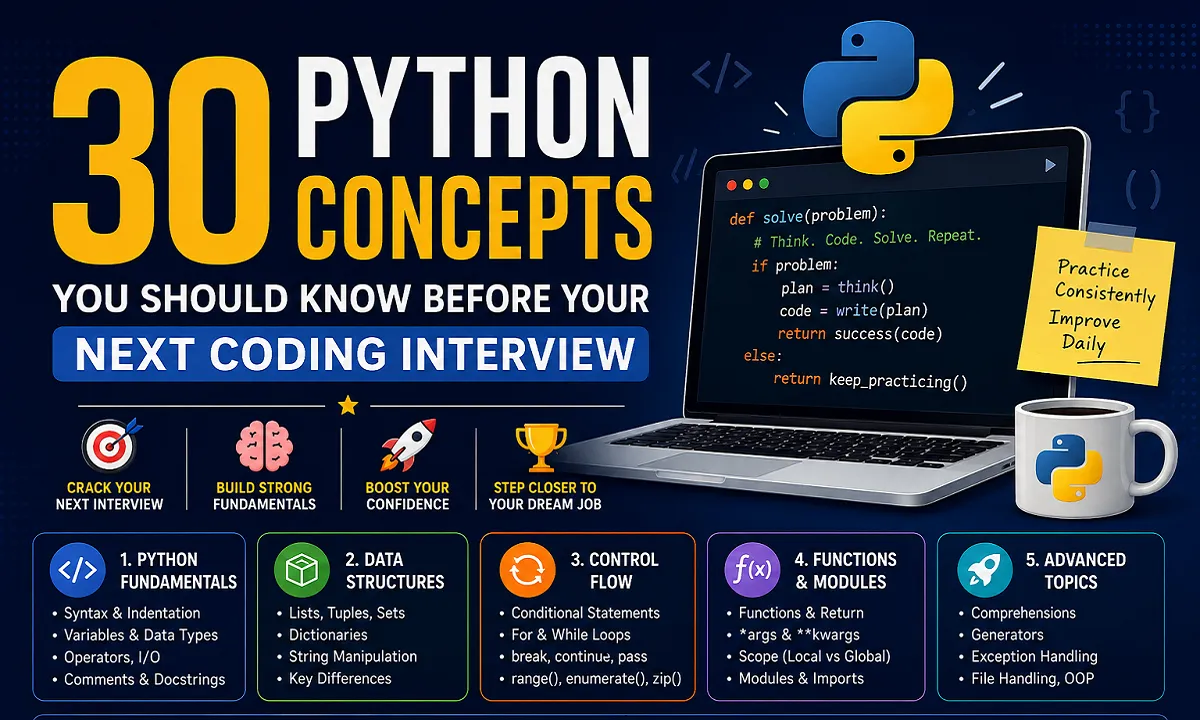
Python is one of the most popular programming languages for beginners and professional developers. It is widely used in web development, automation, data analysis, artificial intelligence, software development, and many other areas.
However, Python’s simple syntax does not necessarily mean Python interviews are always easy. Interviewers often test whether you understand the fundamentals and can apply them to practical programming problems.
If you are preparing for your first Python coding interview, you do not need to memorize every feature of the language. A strong understanding of the core concepts can give you a solid foundation and help you answer many common Python interview questions with confidence.
This guide covers 30 important Python concepts that students, freshers, self-taught programmers, and junior developers should understand before attending a coding job interview.
The goal is not simply to remember definitions. Try to understand how each concept works, when to use it, and why it matters in real-world programming.
What You Will Learn in This Python Interview Guide?
| Category | Topics Covered |
|---|---|
| Python Fundamentals | Syntax, variables, data types, operators, input and comments |
| Python Data Structures | Lists, tuples, sets, dictionaries and strings |
| Python Control Flow | Conditions, loops and iteration tools |
| Python Functions and Modules | Functions, arguments, scope and imports |
| Advanced Python Topics | Comprehensions, generators, exceptions, files and OOP |
Python Fundamentals for Coding Interviews:
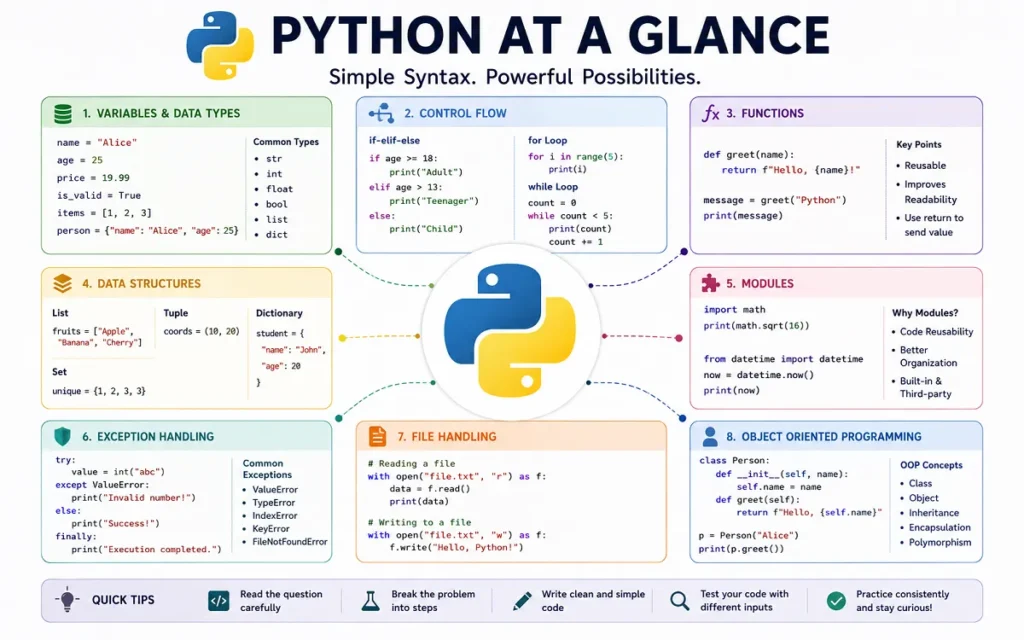
Python fundamentals are the building blocks of everything else you write in the language. Before moving to advanced topics, make sure you are comfortable with Python syntax, variables, data types, and basic operations.
1. Python Syntax and Indentation:
Python is known for its clean and readable syntax. One important feature that makes Python different from many other programming languages is its use of indentation.
Indentation means adding spaces at the beginning of a line to show that the line belongs to a particular block of code.
age = 20

if age >= 18:
    print("You are eligible")
The print() statement is indented because it belongs to the if block.
Why Python Indentation Is Important?
Python uses indentation to define blocks inside:
- Functions
- Conditional statements
- Loops
- Classes
- Exception handling blocks
Incorrect indentation can cause an error.
age = 20

if age >= 18:
print("You are eligible")
The code above will result in an IndentationError.
Common Beginner Mistake:
A common mistake is mixing tabs and spaces or forgetting to indent code inside a function or loop.
Python Interview Question:
Why does Python use indentation?
Python uses indentation to define blocks of code. It improves readability and replaces the braces commonly used in some other programming languages.
2. Variables and Data Types in Python:
A variable is a name used to store a value.
name = "John"
age = 25
salary = 45000.50
is_employee = True
Python automatically determines the type of data stored in a variable.
Common Python Data Types:
Some commonly used Python data types include:
strfor textintfor whole numbersfloatfor decimal numbersboolfor True or False valueslistfor collections of itemstuplefor ordered immutable collectionssetfor unique valuesdictfor key-value pairs
You can check a variable’s type using the type() function.
age = 25

print(type(age))
Understanding Dynamic Typing in Python:
Python is dynamically typed. You do not need to declare the data type of a variable before assigning a value.
value = 100
value = "Hello"
The same variable can refer to values of different types at different times.
Python Interview Tip:
Interviewers may ask how Python’s dynamic typing differs from statically typed languages. In Python, the type is associated with the object rather than permanently fixed to the variable name.
3. Type Casting in Python:
Type casting means converting one data type into another.
For example, user input is usually received as a string. If you want to perform mathematical operations, you may need to convert it to an integer.
age = "25"

new_age = int(age)

print(new_age + 5)
The output will be:
30Common Type Conversion Functions:
Python provides several built-in conversion functions.
int()
float()
str()
list()
tuple()
set()
For example:
price = 99.99

whole_price = int(price)

print(whole_price)
The result will be:
99Converting a float to an integer removes the decimal part.
Common Type Casting Mistakes:
Not every value can be converted successfully.
number = "hello"

int(number)
This will raise a ValueError because "hello" cannot be converted into an integer.
4. Python Operators:
Operators allow you to perform different operations on values and variables.
Arithmetic Operators:
Arithmetic operators are used for mathematical calculations.
a = 10
b = 5

print(a + b)
print(a - b)
print(a * b)
print(a / b)
Python also provides:
a // b   # Floor division
a % b    # Modulus
a ** b   # Power
Comparison Operators:
Comparison operators compare values and return either True or False.
a == b
a != b
a > b
a < b
a >= b
a <= b
Logical Operators:
Logical operators are commonly used with conditions.
age = 25
has_id = True

if age >= 18 and has_id:
    print("Access granted")
The main logical operators are:
andornot
Membership and Identity Operators:
The in operator checks whether a value exists inside a collection.
name = "Python"

print("P" in name)
Python also provides is and is not.
It is important to understand the difference between == and is.
==compares values.ischecks object identity.
5. Python Input and Output:
Python uses the input() function to receive information from users.
name = input("Enter your name: ")

print("Hello", name)
One important thing to remember is that input() returns a string.
age = input("Enter your age: ")If you want to use the input as a number, convert it.
age = int(input("Enter your age: "))Using print() and F-Strings:
The print() function displays output.
name = "Sarah"
age = 24

print(name, age)
F-strings provide a clean way to combine variables and text.
print(f"{name} is {age} years old")Common Beginner Mistake:
Many beginners forget that values returned by input() are strings.
This can cause problems.
age = input("Enter your age: ")

print(age + 5)
The code will fail because Python cannot directly add an integer to a string.
6. Comments and Docstrings in Python:
Comments help developers explain their code.
# Calculate the total employee salary
salary = hours * rate
Python ignores comments when executing the program.
Difference Between Comments and Docstrings:
Comments are generally used to explain individual parts of code.
Docstrings are commonly used to document functions, classes, and modules.
def calculate_total(price, quantity):
    """Return the total price of an order."""
    return price * quantity
Docstrings can help other developers understand the purpose of your code.
Python Fundamentals Interview Questions:
Here are some questions you may encounter:
- Why is indentation important in Python?
- What does dynamic typing mean?
- What is type casting?
- What is the difference between
==andis? - What data type does
input()return? - What is the difference between a comment and a docstring?
Python Data Structures for Interviews:
Data structures allow you to organize and store information efficiently. Choosing the right data structure is an important programming skill.
7. Python Lists:
A list is an ordered and mutable collection.
fruits = ["Apple", "Banana", "Orange"]You can access items using their indexes.
print(fruits[0])Lists are mutable, which means you can change them after creation.
fruits[1] = "Mango"You can also add new items.
fruits.append("Grapes")Common Python List Methods:
Some useful list methods include:
append()
remove()
pop()
insert()
sort()
reverse()
When Should You Use a List?
Lists are useful when:
- The order of items matters
- You need to add or remove items
- Duplicate values are allowed
- The collection may change over time
For example:
products = ["Laptop", "Mouse", "Keyboard"]Common List Mistakes:
A common mistake is trying to access an index that does not exist.
fruits = ["Apple", "Banana"]

print(fruits[5])
This raises an IndexError.
8. Python Tuples:
A tuple is an ordered collection that is immutable.
coordinates = (10, 20)You can access tuple values.
print(coordinates[0])However, you cannot modify an existing item.
coordinates[0] = 50This will raise an error.
Why Tuples Are Immutable?
Immutability means the contents of a tuple cannot normally be changed after creation.
This can be useful when the data should remain fixed.
When Should You Use a Tuple?
Tuples can be useful for:
- Coordinates
- Fixed settings
- Data that should not be changed accidentally
- Returning multiple values from a function
9. Python Sets:
A set stores unique values.
numbers = {1, 2, 3, 3, 4}

print(numbers)
The duplicate value will not appear twice.
How Sets Handle Duplicate Values:
Sets automatically keep only unique elements.
For example:
visitors = {"John", "Sarah", "John", "Mike"}

print(visitors)
This can be useful when you need to remove duplicates.
Common Uses of Python Sets:
Sets are useful for:
- Removing duplicate values
- Checking membership efficiently
- Comparing groups of values
- Mathematical set operations
Example:
team_a = {"John", "Sarah", "Mike"}
team_b = {"Sarah", "David"}

print(team_a & team_b)
The result contains values common to both sets.
10. Python Dictionaries:
A dictionary stores information as key-value pairs.
employee = {
    "name": "John",
    "age": 30,
    "department": "IT"
}
You can access values using their keys.
print(employee["name"])You can add new information.
employee["salary"] = 50000Working With Dictionary Keys and Values:
Dictionaries are useful for structured information.
product = {
    "name": "Laptop",
    "price": 50000,
    "in_stock": True
}
The keys describe the values, making the data easier to understand.
Common Dictionary Methods:
Some useful dictionary methods include:
keys()
values()
items()
get()
pop()
update()
Common Dictionary Mistakes:
Accessing a missing key directly can raise a KeyError.
print(employee["email"])A safer approach is:
print(employee.get("email"))If the key does not exist, get() returns None by default.
11. Python String Manipulation:
Strings represent text.
message = "Python Programming"Strings are immutable, meaning individual characters cannot be directly changed.
Common Python String Methods:
Python provides many useful string methods.
text.lower()
text.upper()
text.strip()
text.replace()
text.split()
Example:
name = "  python developer  "

clean_name = name.strip().title()

print(clean_name)
String Indexing and Slicing:
You can access individual characters using indexes.
word = "Python"

print(word[0])
You can also extract part of a string using slicing.
word = "Python"

print(word[0:3])
The result is:
PytA common interview question is how to reverse a string.
word = "Python"

print(word[::-1])
12. Difference Between Lists, Tuples, Sets and Dictionaries:
Understanding the differences between these four data structures is important for Python interviews.
| Data Structure | Ordered | Mutable | Allows Duplicates | Key Features | Best Use Case |
|---|---|---|---|---|---|
| List | Yes | Yes | Yes | Flexible sequence | Data that may change |
| Tuple | Yes | No | Yes | Immutable sequence | Fixed data |
| Set | No positional indexing | Yes | No | Unique values | Removing duplicates |
| Dictionary | Preserves insertion order | Yes | Keys must be unique | Key-value pairs | Structured information |
When to Use Each Python Data Structure?
Use a list when you need an ordered collection that may change.
Use a tuple when the data should remain fixed.
Use a set when uniqueness is important.
Use a dictionary when values need meaningful keys.
Python Data Structures Interview Questions:
- What is the difference between a list and a tuple?
- Why are tuples immutable?
- How do sets remove duplicate values?
- Can a dictionary have duplicate keys?
- What is the difference between a list and a set?
- What happens when you access a missing dictionary key?
Python Control Flow Concepts:
Control flow determines how a Python program makes decisions and repeats tasks.
13. Conditional Statements in Python:
Conditional statements allow a program to make decisions.
Python uses:
ifelifelse
score = 75

if score >= 90:
    print("Excellent")
elif score >= 50:
    print("Passed")
else:
    print("Failed")
Using if, elif and else:
Python checks the conditions from top to bottom.
Once a matching condition is found, the corresponding block is executed.
Common Conditional Statement Mistakes:
A common mistake is confusing = with ==.
if age == 18:
    print("Eligible")
== compares values.
= assigns a value.
14. Python for Loops and while Loops:
Loops allow you to repeat code.
When to Use a for Loop?
A for loop is commonly used when iterating through a sequence.
names = ["John", "Sarah", "Mike"]

for name in names:
    print(name)
When to Use a while Loop?
A while loop continues as long as a condition remains true.
count = 1

while count <= 5:
    print(count)
    count += 1
How to Avoid Infinite Loops?
Always make sure the condition inside a while loop eventually becomes false.
For example, this loop never changes count.
count = 1

while count <= 5:
    print(count)
This creates an infinite loop.
15. break, continue and pass in Python:
These three keywords are commonly used inside loops and control structures.
Difference Between break, continue and pass:
break stops the loop completely.
for number in range(10):
    if number == 5:
        break

    print(number)
continue skips the current iteration.
for number in range(5):
    if number == 2:
        continue

    print(number)
pass does nothing and can act as a placeholder.
def future_function():
    pass
An easy way to remember them is:
breakmeans stopcontinuemeans skippassmeans do nothing
16. Understanding the range() Function:
The range() function generates a sequence of numbers.
for number in range(5):
    print(number)
The output is:
0
1
2
3
4
Common range() Mistakes:
The ending value is not included.
range(1, 6)Produces:
1, 2, 3, 4, 5You can also provide a step.
for number in range(0, 10, 2):
    print(number)
17. Using enumerate() in Python:
enumerate() provides both the index and the value while looping.
names = ["John", "Sarah", "Mike"]

for index, name in enumerate(names):
    print(index, name)
Why enumerate() Is Useful?
Without enumerate(), beginners often create and manage a separate counter.
enumerate() makes this cleaner.
You can also choose a starting number.
tasks = ["Email client", "Write report", "Attend meeting"]

for number, task in enumerate(tasks, start=1):
    print(number, task)
18. Using zip() in Python:
The zip() function combines items from multiple iterables.
names = ["John", "Sarah", "Mike"]
scores = [85, 90, 78]

for name, score in zip(names, scores):
    print(name, score)
What Happens When zip() Receives Different Lengths?
By default, zip() stops when the shortest iterable ends.
names = ["John", "Sarah", "Mike"]
scores = [85, 90]

for name, score in zip(names, scores):
    print(name, score)
Only two pairs will be created.
Python Control Flow Interview Questions:
- What is the difference between
if,elif, andelse? - When should you use a
forloop? - What is the difference between
breakandcontinue? - Does
range(5)include the number 5? - Why is
enumerate()useful? - What happens when two lists of different lengths are passed to
zip()?
Python Functions and Modules:
Functions allow developers to organize reusable code. Modules help organize larger Python applications.
19. How to Define Functions in Python:
A function groups reusable code.
def greet():
    print("Hello!")
You can call the function using its name.
greet()Function Parameters and Arguments:
Functions can accept parameters.
def greet(name):
    print(f"Hello, {name}")
You can pass an argument when calling the function.
greet("John")Understanding return vs print:
A function can return a value.
def add_numbers(a, b):
    return a + b
result = add_numbers(5, 10)
print(result)print() displays information.
return sends a value back to the place where the function was called.
20. Default and Keyword Arguments:
A default argument provides a value when the caller does not supply one.
def greet(name="Guest"):
    print(f"Hello, {name}")
You can call it in different ways.
greet()
greet("John")
Positional vs Keyword Arguments:
Positional arguments depend on their position.
def create_user(name, age):
    print(name, age)

create_user("John", 25)
Keyword arguments explicitly identify the parameter.
create_user(age=25, name="John")Keyword arguments can make function calls easier to understand.
21. Understanding *args and **kwargs:
These allow functions to accept a flexible number of arguments.
def add_numbers(*numbers):
    return sum(numbers)
print(add_numbers(1, 2, 3, 4))Difference Between *args and **kwargs:
*args collects extra positional arguments.
def show_numbers(*numbers):
    print(numbers)
The values are collected into a tuple.
**kwargs collects keyword arguments.
def show_profile(**details):
    print(details)
The values are collected into a dictionary.
Example:
show_profile(
    name="John",
    age=25,
    city="London"
)
A simple way to remember the difference is:
*argsfor positional arguments**kwargsfor keyword arguments
22. Python Lambda Functions:
A lambda function is a small anonymous function.
square = lambda x: x * x

print(square(5))
When Should You Use Lambda Functions?
Lambda functions can be useful for short and simple operations.
For example:
numbers = [1, 2, 3, 4]

squared = list(map(lambda x: x * x, numbers))
When Are Normal Functions Better?
For complex logic, a normal function is usually easier to understand.
def calculate_salary(hours, rate):
    return hours * rate
Readable code is generally better than clever code that is difficult to maintain.
23. Local and Global Variables in Python:
A local variable is created inside a function.
def show_number():
    number = 10
    print(number)
The variable exists only within that function’s local scope.
Understanding Variable Scope:
A global variable is defined outside a function.
number = 20

def show_number():
    print(number)
The function can read the global variable.
Why Too Many Global Variables Can Cause Problems?
Python allows modification of a global variable using the global keyword.
count = 0

def increase_count():
    global count
    count += 1
However, excessive use of global variables can make code harder to understand and maintain.
Whenever possible, pass values to functions and return the results.
24. Python Modules and Import Statements:
A module is a Python file containing reusable code.
Python provides many built-in modules.
import math

print(math.sqrt(25))
Different Ways to Import Python Modules:
You can import an entire module.
import mathYou can import a specific item.
from math import sqrt

print(sqrt(25))
Why Python Modules Are Important?
Modules help organize larger applications.
For example:
project/
├── main.py
├── database.py
├── users.py
└── payments.py
Each file can handle a different responsibility.
This makes code easier to maintain and reuse.
Python Functions and Modules Interview Questions:
- What is the difference between
print()andreturn? - What are default arguments?
- What is the difference between positional and keyword arguments?
- What is the difference between
*argsand**kwargs? - When should you use a lambda function?
- What is the difference between local and global scope?
- What is a Python module?
Advanced Python Concepts for Interviews:
Once you understand the fundamentals, these concepts can help you write more efficient and better-organized Python code.
25. Python List Comprehensions:
A list comprehension provides a shorter way to create lists.
A traditional approach might look like this:
numbers = [1, 2, 3, 4]

squares = []

for number in numbers:
    squares.append(number * number)
The same result can be created using a list comprehension.
numbers = [1, 2, 3, 4]

squares = [number * number for number in numbers]
List Comprehensions With Conditions:
You can add conditions.
numbers = [1, 2, 3, 4, 5, 6]

even_numbers = [
    number
    for number in numbers
    if number % 2 == 0
]
When to Avoid List Comprehensions:
List comprehensions should improve readability.
Avoid making them too complicated. If a comprehension becomes difficult to understand, a normal loop may be better.
26. Python Dictionary Comprehensions:
Dictionary comprehensions provide a concise way to create dictionaries.
numbers = [1, 2, 3, 4]

squares = {
    number: number * number
    for number in numbers
}
The result will contain numbers as keys and their squares as values.
Practical Uses of Dictionary Comprehensions:
Suppose you want to apply a discount to product prices.
prices = {
    "Laptop": 50000,
    "Mouse": 1000
}

discounted_prices = {
    product: price * 0.9
    for product, price in prices.items()
}
Dictionary comprehensions can make simple transformations more concise.
27. Python Generators and the yield Keyword:
Generators produce values one at a time rather than creating all values immediately.
What Is a Python Generator?
A generator function usually uses the yield keyword.
def count_numbers():
    yield 1
    yield 2
    yield 3
You can iterate through the values.
for number in count_numbers():
    print(number)
Difference Between yield and return:
return ends a function and can send a value back.
yield produces a value while preserving the function’s state so it can continue later.
Generators vs Lists:
A list creates and stores its values.
numbers = [1, 2, 3, 4, 5]A generator can produce values as needed.
numbers = (number for number in range(5))Why Generators Can Save Memory:
Generators can be useful when working with large amounts of data because values are generated when needed rather than all being stored at once.
Common use cases include:
- Processing large files
- Working with large datasets
- Streaming information
- Processing sequences of data
28. Exception Handling in Python:
Programs can encounter unexpected situations. Exception handling helps you manage errors.
try:
    number = int(input("Enter a number: "))
except ValueError:
    print("Please enter a valid number.")
Understanding try and except:
The try block contains code that may produce an error.
The except block handles the error.
Using else and finally:
The else block runs if no exception occurs.
try:
    number = int("10")
except ValueError:
    print("Invalid number")
else:
    print("Conversion successful")
The finally block runs whether an exception occurs or not.
try:
    print("Trying")
except Exception:
    print("Error")
finally:
    print("This always runs")
Common Python Exceptions:
Some common exceptions include:
ValueErrorTypeErrorKeyErrorIndexErrorFileNotFoundErrorZeroDivisionError
Best Practices for Exception Handling:
Try to catch specific exceptions.
Instead of:
try:
    number = 10 / 0
except:
    print("Something went wrong")
Use:
try:
    number = 10 / 0
except ZeroDivisionError:
    print("You cannot divide by zero")
Specific exception handling makes debugging easier.
29. Python File Handling:
Python allows programs to read, write, and modify files.
How to Read Files in Python:
You can open a file in read mode.
file = open("example.txt", "r")

content = file.read()

print(content)

file.close()
How to Write Files in Python:
Write mode allows you to create or overwrite a file.
file = open("example.txt", "w")

file.write("Hello, Python!")

file.close()
How to Append Data to Files:
Append mode adds content to an existing file.
file = open("example.txt", "a")

file.write("\nNew line added")

file.close()
Why You Should Use the with Statement:
The recommended approach is using with.
with open("example.txt", "r") as file:
    content = file.read()
The file is automatically closed when the block is finished.
File handling is commonly used for:
- Log files
- Reports
- Configuration files
- Text processing
- Data storage
30. Object-Oriented Programming Basics in Python:
Object-oriented programming, commonly called OOP, organizes code using classes and objects.
Python Classes and Objects:
A class acts as a blueprint.
class Employee:
    pass
An object is created from the class.
employee = Employee()Attributes and Methods:
Attributes store information about an object.
Methods define what an object can do.
class Employee:

    def greet(self):
        print("Hello")
Understanding the init() Constructor:
The __init__() method is commonly used to initialize object attributes.
class Employee:

    def __init__(self, name, department):
        self.name = name
        self.department = department
Create an object:
employee = Employee("John", "IT")

print(employee.name)
Python Inheritance:
Inheritance allows one class to reuse behavior from another class.
class Person:

    def greet(self):
        print("Hello")
A new class can inherit from it.
class Employee(Person):
    pass
Now an Employee object can use the greet() method.
employee = Employee()

employee.greet()
Advanced Python Interview Questions:
- What is a list comprehension?
- When should you avoid using a list comprehension?
- What is a generator?
- What is the difference between
yieldandreturn? - Why can generators be memory efficient?
- What is the purpose of
finally? - Why should you use
withwhen working with files? - What is the difference between a class and an object?
- What is inheritance?
Quick Python Interview Preparation Checklist:
Use this checklist before attending a Python coding interview.
Python Fundamentals Checklist:
- Understand Python syntax and indentation
- Know common Python data types
- Understand type casting
- Know basic Python operators
- Understand input and output
- Know the difference between comments and docstrings
Python Data Structures Checklist:
- Create and modify lists
- Understand tuples and immutability
- Use sets for unique values
- Work with dictionaries
- Understand string operations
- Know when to use each data structure
Functions and Control Flow Checklist:
- Write conditional statements
- Use
forloops - Use
whileloops safely - Understand
break,continue, andpass - Define functions
- Use parameters and return values
- Understand
*argsand**kwargs - Understand local and global variables
Advanced Python Topics Checklist:
- Write readable list comprehensions
- Understand dictionary comprehensions
- Understand generators and
yield - Handle common exceptions
- Read and write files
- Understand classes and objects
- Know the basics of inheritance
Coding Interview Skills Checklist:
- Practice writing code without copying examples
- Read coding questions carefully
- Think about edge cases
- Use meaningful variable names
- Explain your approach clearly
- Practice Python coding questions regularly
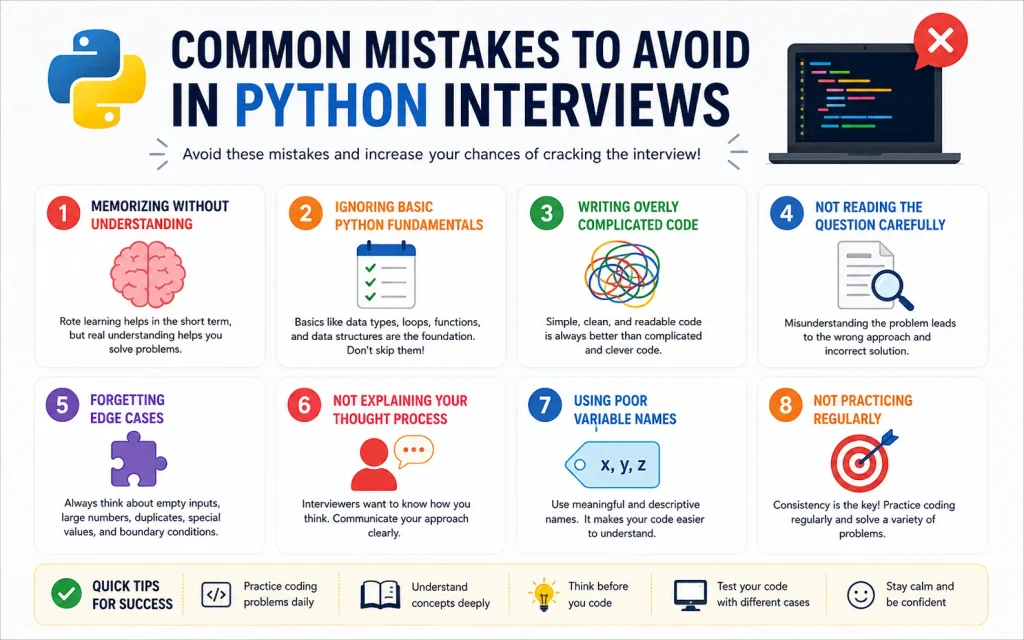
Common Mistakes to Avoid in Python Interview:
1. Memorizing Python Without Understanding the Concepts:
Memorizing definitions may help with basic theory questions, but interviews often test whether you can apply concepts.
For example, it is easy to memorize that a dictionary stores key-value pairs. It is more valuable to understand when a dictionary is a better choice than a list.
Practice using concepts in small programs.
2. Ignoring Basic Python Fundamentals:
Some beginners spend too much time studying advanced topics while forgetting the basics.
Interviewers may ask simple questions such as:
- What is the difference between a list and a tuple?
- What does
enumerate()do? - What is the difference between
breakandcontinue? - What is the difference between
returnandprint?
Strong fundamentals are essential.
3. Writing Overly Complicated Code:
Shorter code is not always better code.
For example:
def calculate_total(price, quantity):
    return price * quantity
This is simple and easy to understand.
Avoid writing complicated code just to demonstrate advanced Python knowledge.
4. Not Reading the Coding Question Carefully:
Before writing code, understand:
- What input is provided?
- What output is expected?
- Are duplicate values possible?
- Can the input be empty?
- Are there special conditions?
A correct solution to the wrong problem is still incorrect.
5. Forgetting Edge Cases:
Always consider unusual situations.
Examples include:
- Empty lists
- Missing dictionary keys
- Invalid user input
- Division by zero
- Duplicate values
- Large amounts of data
For example:
numbers = []

if numbers:
    print(max(numbers))
else:
    print("List is empty")
Thinking about edge cases shows that you understand practical programming.
6. Not Explaining Your Thought Process:
Technical interviews often evaluate your problem-solving approach.
When solving a question, explain:
- What the problem requires.
- What approach you will use.
- Why you selected that approach.
- What edge cases you considered.
Clear communication can help interviewers understand your reasoning.
7. Using Poor Variable Names:
Avoid unclear variable names when possible.
x = 50000
y = 10
z = x * y
A clearer version is:
monthly_salary = 50000
months = 10
total_salary = monthly_salary * months
Meaningful names make code easier to understand and maintain.
8. Not Practicing Python Regularly:
Reading about Python is useful, but programming requires regular practice.
Try building small programs involving:
- Lists
- Dictionaries
- Functions
- Loops
- File handling
- Exception handling
- Classes
You do not need to build a large application every time. Small projects can also improve your understanding.
Final Thoughts:
Preparing for a Python coding interview does not mean memorizing every function and feature in the language. The most important thing is to build a strong understanding of the fundamentals and know how to apply them to practical problems.
These 30 Python concepts provide a solid foundation for students, freshers, self-taught programmers, and junior developers.
Start with Python syntax, variables, data types, and operators. Then become comfortable with data structures, conditions, loops, and functions. Once those concepts become familiar, move on to generators, exception handling, file handling, and object-oriented programming.
Most importantly, practice regularly.
Write small programs. Make mistakes. Debug them. Try different approaches. Practice explaining your code aloud as if you were speaking to an interviewer.
Mastering these 30 concepts will not guarantee that every Python interview question will be easy. However, it will give you a much stronger foundation for understanding coding problems, writing cleaner code, and approaching Python interviews with greater confidence.
A good Python developer is not the person who memorizes the most syntax. A good developer understands the problem, chooses an appropriate solution, considers possible edge cases, and writes clear and reliable code.







Have you ever started explaining something and then suddenly realized… you’re going in circles?
You keep talking. Adding more words. Trying harder.
But instead of becoming clearer… you become more confusing.
It happens to almost everyone.
- You ramble in conversations
- You lose your main point
- People stop paying attention
- You feel frustrated afterward
Now here’s the good news:
👉 You don’t need better English.
👉 You don’t need a big vocabulary.
👉 You just need a simple structure.
That’s where the 3-2-1 Speaking Trick comes in.
It’s one of the easiest and most powerful methods for confident speaking and learning how to stop rambling instantly.
In this guide, you’ll learn:
- What the 3-2-1 Speaking Trick is
- How to use it in real life
- Why it works (in simple terms)
- How it can improve your confidence
Let’s make your speech clear, simple, and powerful.
What Is the 3-2-1 Speaking Trick?
Let’s break it down in the easiest way possible.
👉 3-2-1 Speaking Trick = A simple way to organize your thoughts before you speak
It works like this:
- 3 Points → What are the main ideas?
- 2 Examples → Can you support your idea?
- 1 Conclusion → What is your final message?
That’s it.
No complicated rules. No stress.
Why Most People Ramble (And Don’t Even Realize It)?
Before fixing the problem, we need to understand it.
The Real Reason You Ramble:
You don’t have structure.
That’s all.
When your thoughts are unorganized:
- You keep adding extra details
- You repeat yourself
- You lose direction
Think of it like this:
👉 Speaking without structure is like driving without a map.
You’ll keep moving… but you won’t reach your destination.
How the 3-2-1 Speaking Trick Stops Rambling Instantly?
This speaking trick works because it gives your brain a clear path.
Instead of thinking:
“What should I say next?”
You already know:
- First → your points
- Then → your examples
- Finally → your conclusion
Result?
- You speak with clarity
- You sound confident
- You stop overthinking
Step-by-Step Guide: How to Use the 3-2-1 Speaking Trick
Let’s make this practical.
Step 1: Identify Your 3 Main Points
Ask yourself:
👉 What are the 3 most important things I want to say?
Keep it simple.
Example:
You’re explaining why electric cars are useful.
Your 3 points could be:
- They save fuel money
- They are eco-friendly
- They require less maintenance
Step 2: Add 2 Simple Examples
Now support your idea.
👉 Can I give 2 real or simple examples?
Example:
- Charging costs less than petrol
- Fewer moving parts = fewer repairs
Step 3: End with 1 Clear Conclusion
Finish strong.
👉 What should the listener remember?
Example:
“So overall, electric cars are cheaper and easier to maintain.”
Real-Life Example (Simple and Relatable)
Let’s say someone asks:
👉 “Should I buy a used electric car?”
Instead of rambling, use the 3-2-1 Speaking Trick:
3 Points:
- Lower running cost
- Environment-friendly
- Good for city driving
2 Examples:
- Charging is cheaper than petrol
- Less servicing needed
1 Conclusion:
“If you mostly drive in the city, a used EV is a smart choice.”
See the difference?
👉 Short
👉 Clear
👉 Confident
How This Helps in Confident Speaking?
Let’s connect this to your daily life.
When you use this method, you:
- Speak with purpose
- Avoid unnecessary words
- Feel more in control
This builds confident speaking habits naturally.
Where You Can Use the 3-2-1 Speaking Trick?
This isn’t just for presentations.
You can use it everywhere:
1. Daily Conversations
Talking to friends or family becomes clearer.
2. College or School Presentations
You stay focused and organized.
3. Job Interviews
You answer questions confidently.
4. Explaining Complex Topics (Like EV Cars)
You simplify things easily.
Speaking Clearly About EV Cars (Made Simple):
If you’re someone exploring used EV cars, this trick is perfect.
Let’s simplify a common topic.
What is an EV Car?
An EV (Electric Vehicle) is a car that runs on electricity instead of petrol or diesel.
Use the 3-2-1 Speaking Trick to Explain It:
3 Points:
- Runs on battery
- No fuel needed
- Eco-friendly
2 Examples:
- Charge at home
- Lower running cost
1 Conclusion:
“EVs are a cleaner and cheaper way to drive.”
Simple, right?
Common Mistakes to Avoid While Using This Speaking Trick:
Even simple methods can go wrong if misused.
Avoid these:
- ❌ Adding too many points
- ❌ Giving long, confusing examples
- ❌ Skipping the conclusion
- ❌ Speaking too fast
👉 Remember: Keep it short and focused.
Pro Tips to Master the 3-2-1 Speaking Trick Faster:
Want faster improvement? Follow this:
Daily Practice Routine (5 Minutes Only)
- Pick one topic (anything simple)
- Think of 3 points
- Add 2 examples
- End with 1 conclusion
Example Topics:
- Your favorite food
- Your daily routine
- Why exercise is important
Consistency builds strong speaking habits.
Why This Method Works (In Simple Terms)?
Your brain loves structure.
When you use the 3-2-1 Speaking Trick:
- You reduce confusion
- You organize thoughts faster
- You speak with clarity
It’s like turning chaos into order.
How This Improves Your Confidence Over Time?
Confidence doesn’t come first.
Clarity comes first.
Then confidence follows.
When you:
- Speak clearly
- Get understood
- See positive reactions
👉 Your confidence grows naturally.
Quick Comparison: Rambling vs Clear Speaking
| Rambling: | Clear Speaking: |
|---|---|
| No structure | Clear structure |
| Too many words | Simple sentences |
| Confusing | Easy to understand |
| Low confidence | Strong presence |
A Simple Mindset Shift You Need:
Stop trying to impress people.
Start trying to be understood.
That’s the real goal of communication.
Conclusion: Speak Less, Say More
Let’s bring everything together.
The 3-2-1 Speaking Trick is simple:
- 3 points to organize your thoughts
- 2 examples to support them
- 1 conclusion to finish clearly
That’s all you need to:
- Stop rambling
- Speak with clarity
- Build confident speaking habits
You don’t need perfect grammar.
You don’t need big words.
👉 You need structure.
Final Call to Action:
Start today.
Pick one simple topic.
Use the 3-2-1 Speaking Trick.
Speak it out loud.
It might feel awkward at first.
But with practice…
👉 You’ll speak clearly
👉 You’ll sound confident
👉 People will understand you better
And that’s how real confidence begins.
One clear sentence at a time.


Job interviews can be nerve-wracking, but they’re your golden ticket to landing the dream role you’ve been eyeing. While the pressure is real, many job seekers sabotage their chances by making avoidable mistakes.
As a career coach, I often see people making the same interview mistakes. Let’s break down some common blunders and how to dodge them like a pro. By the end of this article, you’ll be ready to walk into any interview with confidence and clarity. Here’s what to do!
5 Most Common Job Interview Mistakes:
Mistake #1: Being Too Open to “Any Opportunity”:
One of the biggest red flags for recruiters is when candidates seem desperate or unfocused by saying they’re open to “any opportunity.” This vague response makes it look like you haven’t thought about your career goals.
What to Do Instead:
- Tailor your pitch to the specific role you’re applying for.
- Mention the aspects of the role or company that genuinely excite you.
- Prepare a clear narrative about your career path and how this job fits in.
Example: Instead of saying, “I’ll take anything,” say, “I’m particularly drawn to this role because of its focus on specific responsibility. It aligns perfectly with my skills and long-term goals.”
Mistake #2: Not Answering Questions Directly:
Dodging or providing vague answers during an interview can come across as unprepared or evasive. Employers are looking for clear, concise, and honest responses.
What to Do Instead:
- Practice common interview questions and develop structured answers.
- Use the STAR method (Situation, Task, Action, Result) to frame your responses.
- If you don’t know an answer, admit it honestly and pivot to how you’d solve the problem.
Example: If asked about a skill you’re still learning, avoid dodging the question. Instead, say, “While I’m not an expert, I’ve been taking online courses and practicing it in smaller projects.”
Mistake #3: Not Preparing Questions for the Interviewer:
When the interviewer asks, “Do you have any questions for us?” and you reply with, “No, you covered everything,” it’s a missed opportunity to showcase your curiosity and enthusiasm.
What to Do Instead:
- Research the company and role to develop meaningful questions.
- Focus on questions that demonstrate your interest in their culture, goals, or challenges.
- Avoid generic or self-serving questions like, “How much will I get paid?” (Save the salary question for after receiving an offer.)
Example Questions:
- “What does success look like in this role over the first 90 days?”
- “What are some challenges the team is currently facing?”
- “How would you describe the company culture?”
Mistake #4: Having No Value Proposition:
Employers want to know what makes you unique and how you’ll contribute to their team. If you fail to communicate your value, they may struggle to see why you’re the right fit.
What to Do Instead:
- Identify your key strengths and skills relevant to the role.
- Prepare a personal “elevator pitch” that summarizes your unique value.
- Highlight specific achievements or experiences that demonstrate your impact.
Example: Instead of vaguely saying, “I’m a hard worker,” say, “In my previous role, I increased team efficiency by 15% by streamlining our workflow and implementing new tools.”
Mistake #5: Doing Minimal Research on the Role and Company:
Walking into an interview unprepared is a sure way to leave a bad impression. It’s essential to understand the company’s mission, values, and challenges, as well as the specifics of the job description.
What to Do Instead:
- Visit the company’s website, social media pages, and recent news articles.
- Study the job description thoroughly and match it with your skills.
- Learn about the industry trends and competitors to showcase your knowledge.
Example: If interviewing for a marketing role, you could say, “I noticed your recent campaign on social media, and I’d love to contribute by bringing in my experience with my social media marketing skill.
Additional Tips for Nailing Your Job Interview:
Here are some bonus strategies to boost your performance:
- Dress the Part: Even if the company has a casual dress code, showing up polished and professional creates a strong first impression.
- Practice Active Listening: Pay attention to the interviewer’s questions and respond thoughtfully.
- Show Enthusiasm: A genuine smile and positive attitude can go a long way.
- Follow Up: Send a thank-you email within 24 hours, mentioning specific moments from the interview.
Final Words:
Avoiding these common mistakes can make a world of difference in your next job interview. The key is preparation, clarity, and confidence. Tailor your approach to the role, practice answering questions, and show genuine interest in the company. Remember, interviews are a two-way street—it’s not just about them choosing you but also about you choosing them.
By implementing these tips, you’re not just preparing for an interview; you’re setting yourself up for success. Good luck, and go ace that interview!

How do you make your CV noteworthy? The key is to tell your story in a way that grabs attention, while still fitting the standards of your industry. You want to be unique enough to make recruiters or HR professionals notice you, but not so different that it feels out of place. It’s a fine balance, but it’s definitely possible.
In today’s challenging job market, making your CV stand out among hundreds or even thousands of others can be a real challenge. Here are 8 ways to tell your story and ensure your CV gets the nod from HR consultant and hiring managers:
How to Bullet-proof Your CV?
1. Summarise, specify, be succinct:
In other words, get to the point right away. If you’re answering a specific job posting you can integrate the job title into your objective. Or if you’re open to other positions within the company you can indicate this as well, but don’t just throw out some lofty, generalized drivel about how you are an accomplished professional who wants a challenging position with a dynamic company.
Describe yourself and your applicable qualifications, as well as your objective(s) in brief, punchy, dynamic – but not overly dramatic – terms.
2. Integrate keywords from the job advert:
This is important for online CVs because many are tracked via keyword searches. In fact CNN has reported that more than 50% of all online CVs are processed with a tracking system, which work by detecting keywords based on what the recruiters are looking for in candidates. These keywords are generally found in the actual job ad. Because online submission of CVs has become so common it makes sense to use keyword tracking to screen out candidates that is why they says that more than 80% of CVs are only fit for the dustbin.
Be careful, though. Overuse of keywords looks ill-considered and ugly.
3. Avoid cliché words and terms:
Avoid using cliché words but don’t make your CV read as if you’ve been combing a thesaurus. Pity the recruiter reading the same cliché ridden self-descriptions over and over again. Forget over-used words and phrases; try to be a little original. But don’t go out of your way to inject big words when a short, simple one will do.
4. Customize your CV for the intended audience:
Today’s job seeker has to be flexible and versatile. Every company and position is a little different, so if you have a lot of feelers out you may need several different versions of your CV, stressing different aspects of your career objectives and achievements. Study your target individual or web site so you can determine if the CV you’re sending to that person or site is appropriate. Just make sure that one version of your CV doesn’t actually contradict another.
Everything you put out there will come back to haunt you – or reward you, if you’re doing it right.
5. Use subtle design elements – but don’t go overboard:
Whether you’re formatting an online CV or a print CV (yes, some employers still request the latter), you want to strive for visual appeal and distinctiveness, but not visual distraction. Some ATS (Applicant Tracking Systems) – deployed by recruitment team to track the progress of job applications – reject CVs with ‘abnormal’ quirks.
Use only one or two fonts and a minimum of fussy details. Same goes with colors – stick to one or two.
6. Be concise but specific:
The rule of thumb with a CV is to keep it to one or, at most two, printed pages.
Don’t go on and on and on about each topic; hiring professionals are busy and generally overworked as it is. Yet at the same time you want to be as specific as possible about your accomplishments and achievements. Don’t use abstractions such as, “vastly improved click-through in a key department.” Quantify whenever possible, e.g., “I increased click-through rates within the regional events department by 32.7% within 6 months.” If you really can’t quantify – or at least qualify – consider leaving out that particular “achievement.” Otherwise you might get into an awkward conversation during the interview, should you get that far.
If the position you’re shooting for requires a portfolio, send your best stuff – but only if requested (usually the portfolio show-and-tell is reserved for the interview.) Of course if you have an online link to your portfolio you can and should include that in your CV.
7. Use spin but don’t lie:
Recruiters expect a CV to reflect an element of spin but overt embellishments and lies will do you no favours. Yes, you’re expected to put yourself and your achievements in the most favorable light possible. However, extravagant embellishments and lies will always catch up to you, sooner or later – probably sooner, as decent recruiters professionals are wise to job seekers’ tricks.
8. Proofread, proofread, proofread:
Proofread, proofread, and then proofread again. It’s accepted that social activities often involve misspells words or ungrammatical phrases. But it is wholly unacceptable for mistakes to be strewn across your CV – this is a sure way to ensure your application ends up in the bin. It is important that every communication you send out on behalf of your job search is as close to perfect as you can make it. And it’s just as crucial to proofread a CV sent by email, or posted on a web site, as it is to vet a printed CV.
Now here’s the biggest secret of all: there really is no one magic key to influencing a recruiter or HR professional to decide that you are the one. Hiring and recruitment personnel are as individual as the jobseekers. The truth is that for many, if not most, jobseekers, sending out CVs is a matter of trial and error; you may just have to keep on sending them out, perhaps experimenting with different formats and approaches until something works. However, with a little bit of effort and creativity – as well as realistic expectations – you can create a terrific CV that will represent the very best of what you have to offer. Good luck!

Python Interview Cheat Sheet: 30 Python Concepts You Should Know Before Your Next Coding Interview
Python is one of the most popular programming languages for beginners and professional developers. It is widely used in web...

AI Could Replace Millions of Entry-Level Jobs in the UK by 2035: Which Roles Are Most at Risk?
Artificial intelligence is changing the way people work across the UK. From customer service and administration to data processing and...


How to Get a Job When There Are Fewer Vacancies
Looking for a job can become much more frustrating when there are fewer vacancies available. You may be checking job...


Why Is It So Hard to Get a Job in the UK in 2026?
If you have been applying for jobs in the UK and getting very few replies, you are not alone. Many...


Entry-Level Jobs in the UK Compared: Pay, Difficulty, Stress and Career Growth
Starting your career can be confusing, especially when there are so many entry-level jobs available in the UK. While some...


Why Are Graduate Jobs Becoming Harder to Find in the UK?
Graduating from university is supposed to feel like the beginning of a new chapter. You finish your degree, prepare your...


30 Entry-Level Jobs in the UK for People With Little or No Experience
Finding your first job can feel difficult, especially when many vacancies ask for previous work experience. The good news is...

IBM Internship UK: A Complete Guide to Opportunities, Eligibility and How to Apply
An IBM internship can be an attractive opportunity for students and early-career candidates who want practical experience at a major...

Top 10 Hosting Providers for Developers
Developers assess hosting differently from most other webmasters. While absolute costs and total disk space matter, the best web hosting...


Meta and Microsoft Announce Massive Layoffs
Big tech companies like Meta Platforms and Microsoft are reducing their workforce as they spend more money on artificial intelligence...


GPT-5.5 vs Claude: Nano Banana Killer & Claude’s New Design Tool
Artificial Intelligence is evolving at an incredible pace. Every few months, new models and tools are released that push the...


Moltbook: The First Social Network for AI Agents
Artificial Intelligence is evolving rapidly. We’ve moved from simple tools to powerful AI systems that can write, design, analyze, and...


Volkswagen Uses AI Agents to Transform Its Cars in China
The automotive industry is changing faster than ever before—and at the center of this transformation is Artificial Intelligence (AI). One...


AI Is Growing Faster Than You Think
Artificial Intelligence (AI) is no longer something we only see in movies or imagine about the future. It is already...


Could AI Eliminate Humans in the Next 10 Years?
Artificial Intelligence (AI) is advancing at an incredible speed. Every day, new tools, smarter systems, and powerful technologies are being...


Meet NEO: Your New Home Robot Buddy
Imagine coming home after a long day, and instead of doing chores, managing devices, or worrying about security, everything is...


You’ve Been Using AI the Hard Way: How to Use AI Efficiently?
Artificial Intelligence is one of the most powerful tools available today. Millions of people are using AI for writing, design,...

Master AI Engineering: 20 Key Concepts Explained Simply
Artificial Intelligence (AI) is no longer a futuristic idea—it is already shaping our daily lives. From voice assistants to recommendation...


6 Ways You Are Wasting Your Time (And Don’t Even Realize It)
Time slips quietly. Not with loud warnings. Not with alarms. But in small, unnoticed habits you repeat every day. You...


How to Take Nothing Personally: 6 Powerful Ways to Protect Your Peace
Have you ever replayed a single comment in your head for hours… maybe even days? Someone said something small. Maybe...
-
 Career3 years ago
Career Opportunities for Seniors: 7 Jobs that are Perfect for Older Adults
-
 Jobs7 months ago
15 Best Second Jobs to Boost Your Income in the UK for 2026
-

 Career2 years ago
5 Free Job Posting Sites in the UK (For Employers)
-
 How-to7 months ago
How to Make Money with Google Gemini: Practical Methods Anyone Can Start
-
 How-to7 months ago
How to Build Passive Income and Wealth: 26 Lucrative Ideas
-

 AI & Tools7 months ago
10 Insane Ways Google Gemini Will Explode Your Productivity in 2026
-

 Job Description2 years ago
Support Worker Job Description: Qualifications, Skills, Salary, Working Hours
-

 AI & Tools7 months ago
ChatGPT vs Copilot: Which AI Is Best for You in 2026?