
AI & Tools
Digital Tools for Work: 25 Useful Websites for Productivity and Career Skills
Practical digital tools for work, research, learning, AI, automation and career development, with tips for building a simple and useful toolkit.
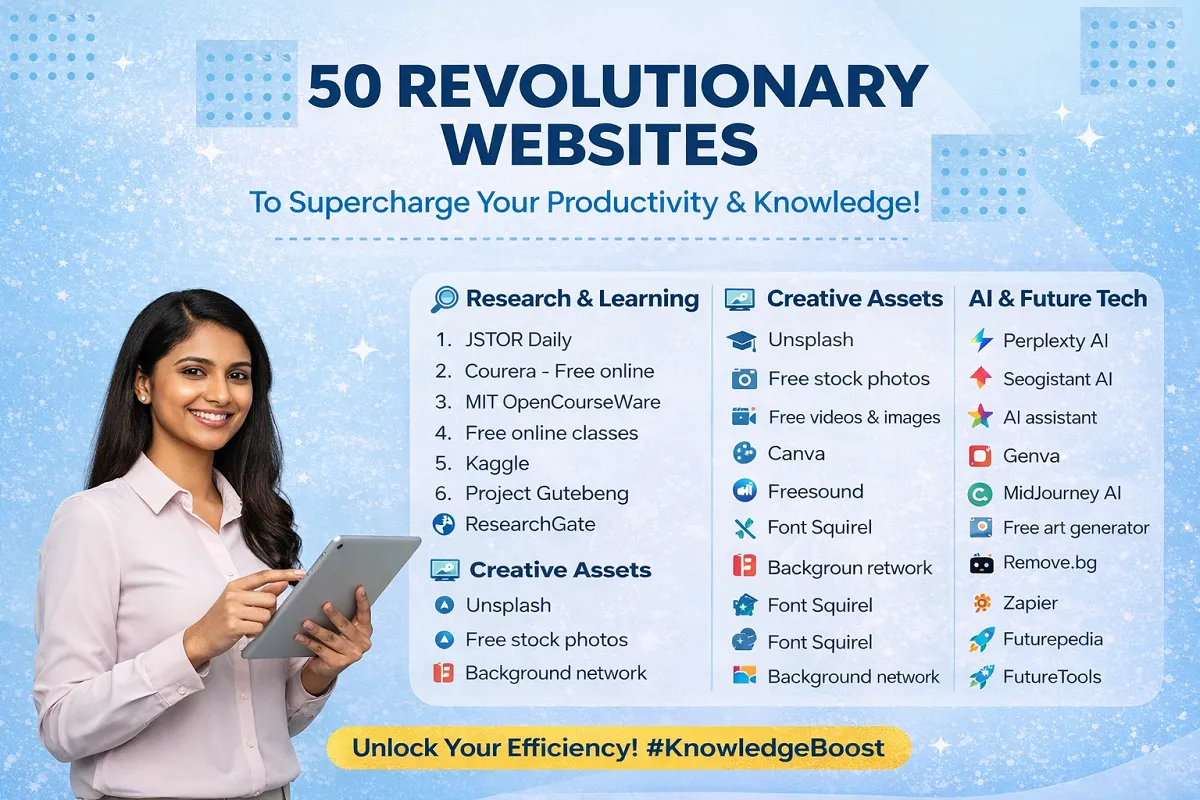
The internet is full of tools that can help you research, communicate, create content, manage information and build useful skills. The challenge is not finding more websites. It is choosing the right ones for the work you actually need to do.
This guide focuses on practical digital tools for work, learning and career development. Instead of trying to use dozens of platforms at once, use the categories below to build a small toolkit that supports your daily tasks.
Why Digital Tools Matter at Work
Good digital tools can reduce repetitive work, make information easier to manage and help you produce better results. They can also make it easier to build skills outside formal education.
But more tools do not automatically mean more productivity. A simple workflow using three well-chosen tools can be more useful than a collection of 30 platforms that you rarely use.
💡 Practical tip: Start with the task, not the tool. Ask what you are trying to accomplish, then choose the website that removes a real obstacle.
Research and Learning Websites
Research and structured learning are useful for students, job seekers and professionals who want to improve their knowledge.
1. JSTOR Daily
JSTOR Daily turns academic research into accessible articles and explanations. It can be useful when you want background information before going deeper into a subject.
2. Coursera
Coursera offers courses and professional learning from universities and organisations. It is useful for building skills in areas such as business, technology, data and communication.
3. MIT OpenCourseWare
MIT OpenCourseWare provides free course materials from MIT. It can be valuable when you want structured material without committing to a full degree programme.
4. Project Gutenberg
Project Gutenberg provides free access to a large collection of public-domain books. It is particularly useful for literature, history, philosophy and classic texts.
5. Kaggle
Kaggle is useful for people developing data science and machine-learning skills. Datasets, notebooks and practical projects can help turn theory into hands-on experience.
6. ResearchGate
ResearchGate connects researchers and provides a place to share and discuss academic work. It can be useful when following research in a specific field.
AI Tools for Everyday Work
AI tools are increasingly becoming part of normal workplace workflows. They can support writing, research, summarisation, brainstorming, data work and other tasks.
7. General AI Assistants
AI assistants can help with first drafts, explanations, brainstorming, summaries and structured problem-solving. The best results usually come when you provide clear context and then review the output carefully.
For a broader guide, see AI Basics for Work and How to Choose AI Tools for Work.
8. Perplexity
AI-powered search platforms such as Perplexity can help organise information and provide sources alongside answers. Always check important claims against reliable original sources.
9. Google AI Tools
Google’s AI ecosystem includes tools for writing, research, data work and experimentation. The right option depends on whether you are working with documents, information, spreadsheets, applications or other tasks.
See our Google AI Tools for Work guide for a task-based overview.
10. AI Image and Creative Tools
AI-powered creative platforms can help with concept development, visual ideas, editing and production. They are useful for marketers, content creators and small businesses, but final visuals should still be checked for accuracy, branding and licensing requirements.
Design and Creative Resources
Visual communication matters across marketing, presentations, social media, training and business documents.
11. Canva
Canva makes it easier to create presentations, social graphics, posters, documents and other visual content without advanced design software.
12. Unsplash
Unsplash provides a large library of photographs that can be useful for websites, presentations and creative projects. Check the current licence terms before using an image commercially.
13. FreeSound
FreeSound is a community-driven collection of sound effects and audio recordings. It can be useful for video, podcast and multimedia projects, subject to each file’s licence.
14. Font Squirrel
Font Squirrel provides fonts that can be useful for branding and design. Always check the individual licence before using a font for commercial work.
15. Background Removal Tools
Online background-removal tools can quickly isolate a subject from an image. They are useful for product images, profile graphics and simple marketing materials.
Automation and Workflow Tools
Automation is most useful when it removes repetitive steps from a process you already understand.
16. Zapier
Zapier connects different applications so information can move automatically between them. Examples include sending a form submission to a spreadsheet, creating a task from an email or triggering a notification after a new lead arrives.
17. Workflow Automation Platforms
Automation platforms can connect business applications and create multi-step workflows. Before automating a process, document the manual steps first. This helps you avoid automating a broken or unnecessary process.
18. Task and Project Management Tools
Digital task-management platforms can help teams organise deadlines, owners and priorities. The specific platform matters less than having a clear system that people actually maintain.
Productivity and Information Management
Productivity is not simply about completing more tasks. It is about making important work easier to organise and repeat.
19. Cloud Document Platforms
Online document platforms make it easier to collaborate, comment, track changes and access files from different devices. They are especially useful for distributed teams.
20. Note-Taking and Knowledge Tools
A good digital notebook can become a personal knowledge base for meeting notes, research, ideas, procedures and project information. Use clear folders, tags or naming conventions so information remains useful later.
21. Calendar and Scheduling Tools
Digital calendars are more useful when they are treated as planning systems rather than simple appointment lists. Block time for focused work, preparation and important follow-ups.
Career and Job Search Resources
Digital tools can also support career development, but they should strengthen your judgement rather than replace it.
22. LinkedIn
LinkedIn can support professional networking, job research, employer research and personal branding. A useful profile should show evidence of your skills rather than simply listing job titles.
23. Online Job Boards
Job boards help you compare vacancies, identify common requirements and understand which skills employers are requesting. Save useful job descriptions and look for patterns across several employers.
24. Online Learning Platforms
Training platforms can help you close a specific skills gap. Choose courses based on the work you want to perform, not simply the number of certificates you can collect.
25. Portfolio and Publishing Platforms
A portfolio website, code repository, writing portfolio or project page can provide evidence of what you can actually do. For many roles, examples of completed work are more useful than a long list of claimed abilities.
How to Choose the Right Digital Tool
Before signing up for another platform, use this simple decision process.
- Define the task: What exactly do you need to accomplish?
- Check your current tools: Your existing software may already solve the problem.
- Compare the main options: Look at features, ease of use, integrations and cost.
- Test the workflow: Use the tool on a real but low-risk task.
- Measure the result: Did it save time, improve quality or reduce errors?
- Keep or remove it: If the benefit is small, do not keep another subscription just because the tool looks impressive.
A Simple Digital Workflow for Work
You do not need a complicated technology stack. A practical workflow might look like this:
| Work Need | Useful Tool Type | Human Responsibility |
|---|---|---|
| Research | Search, academic and AI research tools | Check sources and relevance |
| Writing | Document and AI writing tools | Provide context and edit the result |
| Design | Design and image platforms | Check quality, branding and licensing |
| Repetitive tasks | Automation platforms | Define rules and monitor failures |
| Career development | Job boards and learning platforms | Choose relevant skills and opportunities |
This task-first approach is more sustainable than constantly searching for the newest website.
How AI Changes the Way You Use Digital Tools
AI is making many digital tools easier to operate, but it also changes what good digital skills look like. Instead of memorising every feature, workers increasingly need to know how to define a task, provide useful context, evaluate results and connect tools into a workflow.
For example, an employee might use an AI assistant to create a first draft, a document platform to collaborate with colleagues, an automation tool to route the finished document and a project-management system to track the next action.
The value comes from the workflow, not from any one application.
For more guidance, see How to Use AI Efficiently at Work and AI Skills Every Job Seeker Should Learn.
Common Mistakes to Avoid
- Using too many tools: More apps can create more work.
- Ignoring privacy: Do not upload confidential company, customer or personal information to a service without understanding its data practices.
- Trusting AI output automatically: AI can produce incorrect or incomplete information.
- Automating without testing: A bad automated workflow can repeat errors at scale.
- Collecting certificates without practice: Skills become valuable when you can demonstrate them.
- Chasing every new platform: A reliable tool that fits your workflow is often better than a constantly changing stack.
⚠️ Watch out: Before connecting an AI or automation service to workplace systems, check what permissions it receives and what information it can access.
How to Build Your Personal Digital Toolkit
Start with five categories:
- One reliable research method
- One main document and collaboration system
- One creative or presentation tool if your role needs it
- One AI assistant that fits your work
- One task or automation system for repeatable processes
After using this basic stack for a few weeks, identify the biggest remaining bottleneck. Add another tool only when it solves that specific problem.
Digital Tools as Career Skills
Employers increasingly care about what candidates can accomplish with technology. Simply saying that you are familiar with AI, automation or productivity software is not strong evidence on its own.
A stronger approach is to show outcomes. For example:
- Created a repeatable research process.
- Reduced manual reporting steps.
- Built an automated lead follow-up workflow.
- Created a clearer content production system.
- Used AI with human review to improve first-draft turnaround time.
These examples show practical digital ability and problem-solving, which are useful across many careers.
A 15-Minute Digital Tool Audit
Set a timer for 15 minutes and review the websites and apps you use regularly.
- Write down the tools you used during the past week.
- Group them by task.
- Identify tools that perform overlapping jobs.
- Remove one tool you rarely use.
- Choose one repetitive task that could be simplified.
- Test one small improvement this week.
Repeat this review every few months. Your digital toolkit should change when your work changes.
Frequently Asked Questions
How many digital tools should I use?
There is no ideal number. Use enough tools to support your important workflows without creating unnecessary complexity.
Are AI tools enough to improve productivity?
No. AI can help with individual tasks, but productivity usually improves when the entire workflow is clear, repeatable and well organised.
Should job seekers use AI tools?
Yes, when used responsibly. AI can support research, CV improvement, interview practice and skill development, but applications and career decisions should remain personal and accurate.
Can digital tools replace professional skills?
Tools can automate parts of a task, but judgement, communication, problem-solving, domain knowledge and accountability remain important.
How can I decide whether a paid tool is worth it?
Compare the cost with the measurable value it provides. If a tool saves meaningful time, improves quality or removes a recurring problem, a paid plan may be justified.
Related JobDoor Guides
- How to Choose AI Tools for Work
- AI Basics for Work
- How to Use AI Efficiently at Work
- AI Skills Every Job Seeker Should Learn
- Google AI Tools for Work
Final Thoughts
The best digital toolkit is not the one with the most websites. It is the one that helps you complete important work with less friction and better results.
Choose tools based on real tasks, test them on practical work and remove anything that adds more complexity than value. As AI becomes part of more workplace software, the ability to connect tools, evaluate results and design sensible workflows will become an increasingly useful career skill.


How to Start a Career in Transport and Logistics in the UK
Planning a career in transport and logistics in the UK? See entry-level roles, apprenticeships, qualifications, skills and practical steps to...


Rolls-Royce Internship UK: Eligibility, Opportunities & How to Apply
Find Rolls-Royce internships in the UK with practical guidance on eligibility, opportunities, applications, assessments, skills and preparation.


JLR Internships in the UK: How to Find and Apply
Find JLR internships and undergraduate placements in the UK, with practical guidance on eligibility, applications, career areas, assessments and preparation.


Technology Internships in the UK: How to Find and Prepare
Find technology internships in the UK with practical guidance on choosing a tech career area, building skills, finding employers and...


Deloitte Internship UK: How to Apply and Prepare
A practical guide to Deloitte internships in the UK, covering programmes, eligibility, applications, assessments, skills, student visas and preparation.


How to Prepare for a Remote Interview: Complete Guide
Prepare for a remote or video interview with practical advice on technology, camera setup, communication, notes and handling technical problems.

How to Stay Employable: 12 Long-Term Career Strategies
No one can guarantee permanent employment. Employers change, industries evolve and personal circumstances can affect a career at any stage....


How AI Is Changing Recruitment: What Job Seekers Should Expect
Artificial intelligence is changing recruitment, but not in the simple way many headlines suggest. Employers may use AI to organise...


How to Use AI to Identify Your Transferable Skills
Changing careers can feel difficult because job titles often make people focus on what they have not done instead of...

How to Use AI Responsibly When Applying for Jobs
AI can help job seekers save time when researching roles, improving a CV, preparing a cover letter and practising for...

AI Skills Every Job Seeker Should Learn (Without Becoming an AI Expert)
Artificial intelligence is becoming part of everyday work in many industries. You do not need to become a programmer, data...


How to Get a Job in the UK: A Complete Step-by-Step Guide
Finding a job in the UK can feel difficult, especially when you are competing with many other applicants. The process...


How to Write a CV With No Experience
Find out how to write a CV with no experience, what to include and how students, graduates and first-time job...


What Is a Job Description and What Should You Look For?
What is a job description? Understand what it means, what to look for and how to use it to decide...

Job Interview Preparation: Complete Guide to Before, During and After the Interview
A complete job interview preparation guide covering common questions, competency answers, remote interviews, interview mistakes and what to do after...

Sales Assistant Job Description: Duties, Skills, Salary and Career Guide UK
A Sales Assistant helps customers, processes purchases and supports the day-to-day running of a retail environment.


Web Developer Job Description: Duties, Skills, Salary and Career Guide UK
A Web Developer builds, maintains and improves websites and web applications. See the main duties, skills, qualifications, salary expectations and...

Choose an Entry-Level Job Based on Your Personality and Skills
Choosing your first job can be confusing. There are hundreds of entry-level jobs in the UK, but the best option...

How AI Can Help You Write a CV Without Making It Sound Generic
Find out how to use AI to improve your CV, tailor your experience and write clearer applications without adding false...


Python Interview Cheat Sheet: 30 Python Concepts You Should Know Before Your Next Coding Interview
Python is one of the most popular programming languages for beginners and professional developers. It is widely used in web...
-
 Career3 years ago
Career Opportunities for Seniors: 7 Jobs that are Perfect for Older Adults
-
 Jobs8 months ago
Second Jobs in the UK: 15 Practical Ways to Earn Extra Income
-

 Career2 years ago
5 Free Job Posting Sites in the UK (For Employers)
-
 How-to8 months ago
How to Use Google Gemini for Freelance Work and Career Skills
-
 How-to8 months ago
Passive Income Ideas: Build Long-Term Income Streams
-

 AI & Tools8 months ago
How to Use Google Gemini for Productivity at Work
-

 Job Description2 years ago
Support Worker Job Description: Duties, Skills, Salary and Career Guide UK
-

 AI & Tools8 months ago
ChatGPT vs Microsoft Copilot: Which AI Is Best for You?