Social Media
How YouTube Works: Videos & Recommendations (Explained Simply)
If you’ve ever uploaded a YouTube video and then kept refreshing the page—waiting for views—you’re not alone.
Maybe you asked yourself:
- “Why isn’t YouTube showing my video?”
- “Is the algorithm working against me?”
- “Am I doing something wrong?”
Here’s a gentle truth that often gets missed:
YouTube is not against beginners. It’s simply following rules you were never taught.
Once you understand how YouTube actually works—how videos are uploaded, recommended, and shown to viewers—the fear disappears. What replaces it is clarity and control.
In this guide, I’ll walk you through YouTube step by step, just like a mentor would. No technical overload. No pressure to be perfect. You’ll learn how the YouTube algorithm thinks, what it cares about most, and how you can work with it calmly and consistently.
What Is the YouTube Algorithm?
The YouTube algorithm is simply a recommendation system.
Its only job is this:
Show each viewer the videos they are most likely to enjoy and keep watching.
That’s it.
It doesn’t judge you. It doesn’t know you’re a beginner. It just watches behavior—what people click, how long they watch, and what they ignore.
Think of YouTube like a librarian.
If people keep borrowing the same book and reading it fully, the librarian puts it on display. If they stop halfway, it gets moved back to the shelf.
The Big Mindset Shift: YouTube Serves Viewers, Not Creators
This mindset change removes a lot of stress.
YouTube’s priority order looks like this:
- Viewers
- Watch experience
- Creators
That might sound discouraging, but it’s actually freeing.
It means you don’t need tricks. You just need to help the viewer.
When your video helps, YouTube helps you.
How Videos Enter the YouTube System?
Every video follows the same journey.
Step 1: Upload & Format
When you upload a video, YouTube first looks at:
- Title
- Thumbnail
- Description
- Format (Shorts, long-form, or live)
These elements help YouTube understand who the video might be for.
Shorts, Long-Form, and Live Explained:
YouTube Shorts
- Short, vertical videos
- Tested quickly
- High reach, lower commitment
Long-Form Videos
- Deeper content
- Slower growth
- Stronger trust
Live Videos
- Real-time engagement
- Builds loyalty
- Less algorithmic push
Beginners often do best starting with one format, not all three.
The Home Page: Your First Big Opportunity
The YouTube Home Page is where most views come from.
But here’s the key:
YouTube doesn’t push your video to everyone. It tests it with a small group first.
This test group is chosen based on:
- Past viewing behavior
- Topics they enjoy
- Similar videos watched
If that group clicks and watches, the test expands.
The Recommendation Feed Explained:
After Home Page testing, videos move into the recommendation feed.
This includes:
- “Up Next” videos
- Suggested side videos
YouTube asks two quiet questions here:
- Do viewers click?
- Do they keep watching?
If yes, your video travels further.
The Three Signals That Matter Most:
Forget everything else for now.
Focus on these three.
1. Click-Through Rate (CTR)
CTR means how many people click after seeing your video.
Plain English:
- Good title + thumbnail = higher CTR
2. Watch Time (Most Important):
Watch time means how long people stay.
YouTube loves videos that:
- Hold attention
- Reduce skipping
- Feel satisfying
A 5-minute video fully watched often beats a 20-minute video abandoned early.
3. Viewer Satisfaction:
This includes:
- Likes
- Comments
- Shares
- Subscribes after watching
These tell YouTube: “This video felt good.”
Search & Trends: The Quiet Traffic Source
YouTube is also a search engine.
Videos rank when they:
- Answer clear questions
- Match search intent
- Stay relevant over time
Examples:
- How YouTube algorithm works
- How to grow on YouTube for beginners
Search traffic grows slowly—but steadily.
Ads, Premium, and Monetization:
YouTube makes money through:
- Ads
- YouTube Premium
- Creator tools
This matters because:
YouTube prefers videos that keep people on the platform longer.
Happy viewers = healthy platform.
The Creator Dashboard: Your Feedback Loop
Your YouTube Studio is not a report card. It’s a guide.
Track only:
- Impressions
- Click-through rate
- Average watch time
Ignore vanity metrics early.
A Simple Beginner Content System:
Let’s make this calm and doable.
Weekly Plan:
- One clear topic
- One video
- One improvement
That’s enough.
Common Beginner Mistakes (And Gentle Fixes):
Mistake: Obsessing over subscribers
Fix: Focus on watch time
Mistake: Copying big creators
Fix: Serve beginners like you
Mistake: Uploading randomly
Fix: Pick one topic lane
Tracking Progress Without Anxiety
Use a simple rule:
Compare yourself only to last week.
Write down:
- What worked
- What didn’t
- What you’ll try next
Progress becomes visible—and calmer.
Final Thoughts:
YouTube is not a lottery.
It’s a feedback system.
When you understand how videos and recommendations work, the fear fades. You stop guessing. You stop blaming the algorithm. You start improving with intention.
You don’t need to go viral.
You need to be useful.
Upload one helpful video this week.
Learn from it.
Adjust.
Upload again.
That’s how YouTube growth really works—quietly, steadily, and under your control.

Social Media
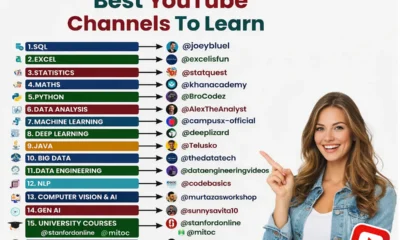
Best YouTube Channels to Learn Tech Skills for Free
Learning technology skills today is easier than ever. You don’t need expensive courses or a computer science degree anymore. YouTube has become one of the biggest learning platforms in the world, where millions of people learn programming, data analysis, artificial intelligence, and other tech skills completely free.
But here’s the problem.
When you search “learn coding” or “learn data science” on YouTube, you get thousands of videos. It’s overwhelming. Where do you start? Which channels should you trust? What skills should you learn first?
If you’ve ever felt confused or stuck, you’re not alone.
Many beginners want to learn tech skills but don’t know the right roadmap. They jump from one tutorial to another and eventually give up.
This guide will fix that.
In this blog post, you’ll learn:
- The best YouTube channels to learn tech skills
- Which skills to learn first
- A simple learning system for beginners
- How to track your progress and stay motivated
By the end, you’ll have a clear plan to start learning tech skills today — without stress or confusion.
Let’s begin.
Why Learning Tech Skills on YouTube Works?
Before we talk about the best channels, let’s answer an important question.
Can you really learn tech skills on YouTube?
The answer is yes — and thousands of developers prove it every year.
Many successful programmers, data analysts, and AI engineers started by learning from YouTube tutorials.
Here’s why YouTube works so well for learning:
1. It’s Completely Free:
Many online courses cost hundreds of dollars.
But YouTube gives you high-quality tutorials for free.
2. Learn at Your Own Speed:
You can:
- Pause
- Rewatch
- Slow down videos
- Practice alongside the instructor
This makes learning easier for beginners.
3. Real-World Projects:
Many YouTube creators teach by building real projects like:
- Websites
- Data dashboards
- Machine learning models
- Apps
This helps you learn practical skills, not just theory.
4. Updated Content:
Technology changes fast.
YouTube creators often update tutorials regularly, so you learn modern tools and techniques.
The Best Tech Skills You Can Learn on YouTube:
If you’re new to tech, it’s important to focus on high-demand skills.
These skills are used in many tech careers today.
Here are the most valuable ones.
1. SQL (Structured Query Language):
SQL is used to work with databases.
Almost every company stores data, so SQL is extremely valuable.
You’ll learn how to:
- Retrieve data
- Filter information
- Analyze datasets
- Work with company databases
SQL is one of the easiest tech skills for beginners.
It’s widely used in:
- Data analysis
- Business intelligence
- Software development
Recommended channel:
2. Excel for Data Analysis:
Many people underestimate Excel.
But companies still use Excel heavily for data analysis and reporting.
Learning Excel helps you:
- Analyze business data
- Create dashboards
- Build financial models
- Automate tasks
Excel is often the first step into data analytics.
Recommended channel:
3. Statistics for Data Science:
Statistics helps you understand and interpret data.
Without statistics, data analysis becomes guesswork.
You’ll learn concepts like:
- Probability
- Mean and median
- Standard deviation
- Data distribution
Statistics is essential for:
- Data scientists
- Machine learning engineers
- Analysts
Recommended channel:
StatQuest is famous for making complex topics simple and fun.
4. Mathematics for Machine Learning:
Machine learning relies heavily on mathematics.
But don’t worry — you don’t need advanced math to start.
Begin with:
- Linear algebra basics
- Probability
- Calculus concepts
Good tutorials make math feel much less scary.
Recommended channel:
5. Python Programming:
Python is one of the most popular programming languages in the world.
It’s beginner-friendly and extremely powerful.
Python is used for:
- Web development
- Data science
- Artificial intelligence
- Automation
- Cybersecurity
Why beginners love Python:
- Easy to read syntax
- Huge community
- Thousands of libraries
Recommended channel:
6. Data Analysis:
Data analysis is about finding insights from data.
Businesses use data analysts to make decisions.
You’ll learn tools like:
- Python
- SQL
- Excel
- Power BI
- Tableau
Recommended channel:
His tutorials focus on practical, job-ready skills.
7. Data Science and Machine Learning:
Machine learning is one of the most exciting fields in tech today.
It teaches computers to learn from data.
Applications include:
- Recommendation systems
- Fraud detection
- Image recognition
- Chatbots
Recommended channel:
Their explanations are beginner-friendly.
8. Deep Learning:
Deep learning is a specialized part of machine learning.
It uses neural networks to solve complex problems.
Deep learning powers:
- Self-driving cars
- Voice assistants
- Image recognition
- AI tools like ChatGPT
Recommended channel:
Their videos explain deep learning visually.
9. Java Programming:
Java is a powerful programming language used by many companies.
It’s used for:
- Android apps
- Enterprise software
- Banking systems
- Backend development
Recommended channel:
10. Big Data:
Big Data refers to handling massive datasets.
Companies like Amazon and Netflix process huge amounts of data daily.
Big Data technologies include:
- Hadoop
- Spark
- Kafka
Recommended channel:
A Simple Learning Roadmap for Beginners:
If you’re new, don’t try learning everything at once.
Follow this simple roadmap.
Step 1: Start With Python
Python is beginner-friendly and useful in many fields.
Step 2: Learn SQL
This helps you work with real data.
Step 3: Practice Data Analysis
Use Excel or Python to analyze datasets.
Step 4: Learn Statistics
Statistics helps you understand data patterns.
Step 5: Explore Machine Learning
Once you understand data, machine learning becomes easier.
How to Stay Consistent While Learning?
Learning tech skills takes time.
Many beginners quit because they feel overwhelmed.
Here’s how to stay consistent.
1. Study 30–60 Minutes Daily:
Consistency beats intensity.
Small daily progress adds up.
2. Build Small Projects:
Projects help you remember concepts.
Example projects:
- Budget tracker
- Weather app
- Data dashboard
3. Track Your Progress:
Keep a learning journal.
Write down:
- What you learned today
- Problems you solved
- New concepts
Tracking progress boosts motivation.
4. Join Tech Communities:
Online communities help you stay motivated.
Examples:
- Discord groups
- GitHub communities
Common Mistakes Beginners Make:
Avoid these mistakes.
Learning Too Many Things at Once
Focus on one skill at a time.
Watching Without Practicing
Always code alongside tutorials.
Comparing Yourself to Others
Everyone learns at a different pace.
The Simple System to Master Tech Skills:
Here’s a powerful formula:
Learn → Practice → Build → Share
- Learn from tutorials
- Practice the concept
- Build a project
- Share your work online
Repeat this cycle and your skills will grow fast.
Final Thoughts:
Learning tech skills used to require expensive degrees and formal training.
Today, YouTube has changed everything.
With the right channels and a clear learning plan, you can learn:
- Programming
- Data science
- Artificial intelligence
- Data engineering
- Machine learning
Completely free.
But remember something important.
Watching videos alone won’t change your life.
Action will.
Start small.
Watch one tutorial today.
Practice one concept.
Build one tiny project.
Progress might feel slow at first.
But in a few months, you’ll look back and realize how far you’ve come.
Your future in tech doesn’t start tomorrow.
It starts today. 🚀
Social Media
How to Run Meta Ads on a Small Budget ($100/Day Strategy That Actually Works)
Most businesses believe you need a huge advertising budget to get results from Meta Ads.
That’s simply not true.
In fact, some of the smartest advertisers grow faster because they start small. When you’re working with $100–$300 per day, every click matters. Every impression counts. Every decision must be strategic.
If you’ve ever asked:
- Can I run Meta Ads with $100 per day?
- How do I get big results with a low budget?
- Why do small-budget campaigns fail?
- What’s the smartest structure for limited spend?
This guide will walk you through a complete, modern, and practical strategy for running Meta Ads on a small budget in 2026 — without wasting money.
Let’s break it down step by step.
The Truth About Small-Budget Meta Ads:
Small budgets don’t fail because of money.
They fail because of structure.
When advertisers copy large-budget strategies and apply them to $100 per day, the algorithm doesn’t get enough data to optimize properly.
With limited budget, your strategy must be:
- Focused
- Simple
- Conversion-oriented
- Creative-driven
- Data-efficient
The key is precision, not scale.
Step 1: Choose ONE Objective (Not Three)
The biggest mistake small advertisers make is trying to:
- Get sales
- Get followers
- Get engagement
- Build awareness
All at once.
When you’re spending $100 per day, you cannot afford scattered signals.
Choose one clear goal:
- Lead generation
- Website purchase
- WhatsApp inquiries
- Messenger conversations
Meta’s algorithm works best when the objective is crystal clear.
New Strategy Tip:
If you’re new, start with “Leads” or “Messages” instead of “Sales.” These objectives require fewer conversion signals and optimize faster with small budgets.
Step 2: Go Narrow With Messaging, Broad With Targeting
Traditional advice says narrow your audience.
In 2026, that approach can backfire with small budgets.
Instead:
- Use broad targeting.
- Let Meta optimize delivery.
- Narrow your MESSAGE, not your audience.
Example:
Instead of targeting:
“Business owners, marketing, 25–45, interests in ads”
Use:
Broad audience 21–45
But your ad copy should clearly speak to:
“Local gym owners struggling with lead generation.”
This filters your audience naturally through messaging instead of over-restricting delivery.
This is modern targeting logic.
Step 3: Use the Single Ad Set Strategy
When budget is small, complexity kills performance.
Do NOT create:
- 5 ad sets
- 10 audiences
- Multiple campaign types
Instead:
Campaign Structure:
1 Campaign
1 Ad Set
3–5 Creatives
This allows the algorithm to focus all spend into testing creatives instead of splitting budget across audiences.
Creative testing matters more than audience testing at low spend.
Step 4: Focus 80% on Creative Quality
On small budgets, creative is everything.
Why?
Because you cannot outbid competitors.
You must out-hook them.
Your ad must stop the scroll instantly.
New Creative Formula (High-Performance Structure):
- Pattern interrupt (first 3 seconds)
- Specific problem call-out
- Simple promise
- Proof or logic
- Clear call to action
Example:
“Spending money on Meta Ads but not seeing sales?”
Here’s how to generate 20 leads with $100/day.”
Keep it simple. Clear. Direct.
No fluff.
Step 5: Optimize for Click Quality, Not Just CPC
Many advertisers celebrate low CPC.
But low CPC doesn’t equal profit.
Instead, monitor:
- CTR (aim above 1.5%)
- Landing page view rate
- Cost per result
- Frequency (keep below 2.5 at small scale)
If CTR is low:
It’s a creative issue.
If CTR is high but conversions are low:
It’s a landing page issue.
Diagnose correctly before increasing budget.
Step 6: Leverage WhatsApp & DM Funnels
Small-budget advertisers often cannot afford complex sales funnels.
So simplify.
Use:
- Click-to-WhatsApp ads
- Click-to-Messenger ads
- Instant forms (Lead Ads)
Direct conversations convert better at low spend because:
- Trust builds faster
- Objections are handled immediately
- Friction is lower
Pro Tip:
Use automated replies for first response:
“Thanks for reaching out! What are you looking to achieve?”
This keeps engagement alive while you respond manually.
Step 7: Use Budget Stability, Not Aggressive Scaling
If your $100 campaign starts performing well:
Do NOT double it to $500 instantly.
That disrupts learning.
Instead:
Increase by 20–30% every 3 days.
Let delivery stabilize.
Scaling small budgets requires patience.
Step 8: Understand Before & After Metrics
Many advertisers look at spend only.
Instead, measure improvement.
Before:
$624 cost per result.
After:
$100–$200 cost per result.
The shift happens when:
- Creative improves
- Objective aligns
- Targeting simplifies
- Funnel reduces friction
Track trends, not daily fluctuations.
Small budgets fluctuate more. Look at 3–5 day windows.
Step 9: Retarget Smartly (Even With Small Budgets)
Retargeting is powerful, but small budgets can’t sustain large retargeting pools.
Here’s a better approach:
Create a single custom audience combining:
- Website visitors (30 days)
- Video viewers (50%)
- Page engagers (30 days)
Run a simple testimonial or proof-based ad to this audience.
Budget: $30–$50 daily.
Even small retargeting improves conversion rates dramatically.
Step 10: Fix the Real Problem – Offer Clarity
Most small-budget failures are not ad failures.
They are offer failures.
Ask yourself:
- Is my offer specific?
- Is the result measurable?
- Is the promise believable?
- Is the call-to-action clear?
Example:
Bad:
“Improve your marketing.”
Better:
“Get 15 qualified leads in 7 days using Meta Ads.”
Clarity increases conversions more than budget increases do.
New 2026 Strategy: Micro-Angle Testing
Instead of testing different audiences, test micro-angles.
Example product: Fitness coaching.
Test 3 micro-angles:
- Weight loss for busy moms
- Fat loss after 40
- Home workout results in 30 days
Same campaign.
Same audience.
Different message focus.
This isolates messaging impact.
Small budgets demand message precision.
How to Know When $100 Is Not Enough?
Small budgets work best for:
- Local businesses
- Niche services
- Low-ticket offers
- Lead generation
They struggle when:
- Selling high-ticket products cold
- Competing nationally in eCommerce
- Running broad awareness campaigns
If your cost per result exceeds 3x your target consistently after 10 days, reconsider:
- Offer
- Funnel
- Creative
- Objective
Not just budget.
The Psychological Advantage of Small Budgets:
There’s an unexpected benefit.
When budget is limited:
- You test smarter.
- You analyze deeper.
- You optimize faster.
- You remove waste quickly.
Large budgets allow laziness.
Small budgets force discipline.
And disciplined advertisers scale better long term.
Complete Action Plan for $100/Day
Here’s your practical roadmap:
- Choose one objective (Leads or Messages).
- Create one campaign with one ad set.
- Launch 3–5 strong creative variations.
- Monitor CTR and cost per result.
- Fix creative before adjusting targeting.
- Add small retargeting after 7 days.
- Scale gradually if profitable.
Simple. Focused. Repeatable.
Final Thoughts: Big Results Don’t Require Big Spend
Running Meta Ads on a small budget is not about luck.
It’s about structure.
When you:
- Simplify targeting
- Strengthen messaging
- Focus on creative
- Use direct conversations
- Scale patiently
$100 per day can outperform $1,000 per day campaigns run carelessly.
The advertisers who master low-budget discipline are the ones who scale efficiently later.
Start small.
Test smart.
Optimize deeply.
Scale steadily.
Big results with low spend are possible — if strategy leads, not emotion.
If you’d like, I can now:
- Create an SEO-optimized meta title and description
- Generate Pinterest titles & descriptions
- Or build a content cluster around small-budget Meta Ads strategy
Just tell me what you need next.
Social Media
How to Get Instagram Followers with Meta Ads (Step-by-Step Funnel Strategy)
If your goal is to consistently add 20, 50, even 100+ new Instagram followers per day, and turn those followers into booked calls or paying clients, this guide will walk you through the exact system.
This isn’t theory. It’s a structured Instagram follower funnel that has worked reliably for years when implemented correctly.
Let’s break it down clearly and strategically.
The Instagram Follower Funnel (Overview):
At a high level, the process looks like this:
- Promote high-performing organic posts
- Drive profile visits at a low cost
- Convert profile visitors into followers
- Start DM conversations
- Invite qualified prospects to a call
- Close clients
For many business-to-consumer (B2C) offers, you can generate followers for under $2 each. B2B niches tend to be more expensive, but the principle remains the same.
This is a top-of-funnel growth strategy. It feeds your ecosystem with new, relevant people daily.
When to Boost Posts vs. Use Ads Manager?
Before diving into Ads Manager, let’s clarify something important.
If you are:
- Just starting out
- Spending under $100/day
- Testing the waters
Then simply boosting posts directly from Instagram is often the easiest and fastest route.
You publish a strong post → tap “Boost” → target properly → drive profile visits.
It’s simple and effective.
However…
You should use Ads Manager if:
- You’re spending $100+/day
- You want more control over targeting
- You have a strong organic presence
- You don’t want boosted posts affecting engagement patterns
Some accounts notice a temporary engagement dip after boosting directly from Instagram. It usually stabilizes, but if you want full control, Ads Manager is the better route.
Important Reality Check: Results Can Vary
Follower campaigns produce mixed outcomes depending on execution.
Some accounts:
- Get large volumes of profile visits but fewer follows.
Others:
- Get fewer visits but higher-quality followers who convert into sales.
That’s why testing is critical.
One advantage of using Ads Manager is scale flexibility. You can load 10–20 of your best organic posts into one campaign and let Meta distribute budget across the strongest performers.
Instead of guessing which content works, you let data decide.
Step-by-Step: Setting Up the Campaign
Step 1: Create a Traffic Campaign
Inside Ads Manager:
- Click Create
- Select Traffic as the objective
(Currently, there is no “optimize for follows” option.)
We optimize for Instagram profile visits, since that’s the closest measurable action tied to gaining followers.
Choose Manual Traffic Campaign.
Step 2: Campaign Setup
At the campaign level:
- Use a clear naming structure (e.g., “O – Follow – TOF”)
- Enable Campaign Budget Optimization (if using one ad set)
- Set daily budget between $20–$100
Follower ads are best used for top-of-funnel growth.
Step 3: Ad Set Setup (Targeting Strategy)
This is where most mistakes happen.
Because we’re optimizing for a cheap action (profile clicks), Meta will try to find people who click easily—not necessarily your ideal clients.
So targeting matters more here than in conversion campaigns.
Why You Should Use Lookalike Audiences?
Unlike lead campaigns where pixel data refines targeting over time, traffic campaigns need stronger audience filtering upfront.
Best practice:
- Create Lookalike audiences from:
- Qualified calls
- Existing clients
- High-quality leads
Upload your client list → build Lookalike → use that as your audience base.
Turn off broad Advantage Lookalike expansion (at least during testing).
A 2–4 million audience size is typically ideal.
You can refine further by:
- Age range
- Income filters (if applicable)
- Industry alignment
Remember: you want people who can actually afford your services.
Placement Settings:
Switch from Advantage placements to Manual placements.
Turn off Facebook placements.
Keep it focused on Instagram feeds, stories, and placements that drive attention and profile clicks.
Understanding the Limitation of Follower Campaigns:
Because we are optimizing for a low-commitment action (profile visit), this campaign behaves differently than conversion campaigns.
You must:
- Target more intentionally
- Monitor quality closely
- Accept that scaling has limits
If you have a large budget, prioritize optimizing for actual business outcomes (booked calls, purchases, applications).
Follower ads should complement—not replace—revenue campaigns.
Step 4: Ad Level – Use Your Best Organic Content
This is critical.
Do NOT create brand-new ad creatives.
Instead:
- Select your top 10–20 organic posts
- Use posts that already performed well
- Ensure each one speaks directly to your ideal client
Example:
If you help CrossFit coaches:
- Do not run general fitness tips.
- Only promote posts that directly address CrossFit coaches.
Otherwise, you’ll attract irrelevant followers.
Why Instagram Growth Is Different?
Before jumping into ads, it’s important to understand what has changed:
- Organic reach fluctuates heavily.
- Reels are saturated.
- Audience trust matters more than viral spikes.
- Quality followers outperform large random audiences.
- Meta’s AI algorithm rewards engagement depth, not just impressions.
That means blindly boosting posts is not enough. You need structured growth.
Step 1: Prepare Your Instagram Profile for Paid Traffic
Running ads to an unoptimized profile is the fastest way to waste money.
Before launching campaigns, optimize:
1. Profile Photo
Use a clear, high-resolution face (for personal brands) or clean logo (for businesses).
2. Bio Structure Formula
Use this 3-line structure:
- Who you help
- What result you provide
- Clear call-to-action
Example:
Helping Coaches Scale to 6-Figures
Proven Instagram Growth Systems
↓ Free Training Below
3. Content Foundation
Have at least:
- 6–9 strong posts
- 3 high-value reels
- 2 authority-building carousels
- Pinned content that explains who you are
Paid traffic only works when visitors see value immediately.
Step 2: Choosing the Right Meta Ads Objective
Many people select the wrong objective and burn their budget.
In 2026, the best objectives for follower growth are:
1. Engagement Campaign (Optimized for Profile Visits)
Best for creators.
2. Traffic Campaign (Optimized for Profile Clicks)
Great for niche audiences.
3. Video Views Campaign (For Reel Amplification)
Excellent for warming up cold audiences.
Avoid:
- Conversion campaigns (unless selling something)
- Awareness-only campaigns (low-quality engagement)
Step 3: The “Profile Magnet” Strategy (New 2026 Approach)
Instead of running ads directly asking for followers, use a Profile Magnet Reel.
What Is a Profile Magnet?
It’s a short, highly valuable reel that:
- Solves one specific problem
- Ends with “Follow for more”
- Creates curiosity for your other content
Example Hooks:
- “Nobody tells you this about Instagram growth…”
- “If you’re struggling to get followers, watch this…”
- “3 mistakes killing your engagement”
Run ads to this reel using the Engagement objective.
Why it works:
- Warms audience
- Builds trust
- Makes following natural
Step 4: Laser-Targeting in 2026
Old interest stacking doesn’t work the same way anymore.
Instead use:
1. Broad Targeting + Strong Creative
Meta’s AI is smarter now. Sometimes broad targeting (no interests) performs better.
2. Micro-Interest Layering
Instead of 10 interests, use 2–3 tightly related ones.
Example:
If targeting fitness coaches:
- Online coaching
- Personal training certification
- Fitness entrepreneurship
3. Lookalike Strategy
Once you reach 1,000+ engaged users:
- Create Lookalike from video viewers
- Create Lookalike from profile visitors
- Create Lookalike from page engagement
This is where scaling becomes powerful.
Step 5: Ad Creative That Converts to Followers
The ad creative matters more than targeting.
Winning Creative Formula:
- Strong hook in first 2 seconds
- Fast pacing
- Subtitles (85% watch muted)
- Clear call-to-action
Example Script:
“If you’re trying to grow on Instagram and nothing works, stop doing this… Instead, focus on…”
Then end with:
“Follow for daily growth strategies.”
Avoid:
- Overly polished ads
- Stock-style promotional videos
- Hard selling
Native-looking content wins.
Step 6: Budget Strategy for Small Creators
You don’t need a massive budget.
Starter Plan:
- $5–10 per day
- Run 1 creative for 5 days
- Kill underperformers quickly
Scaling Plan:
- Duplicate winning ad
- Increase budget by 20% every 3 days
- Don’t jump from $10 to $100 instantly
Consistency beats spikes.
Step 7: Track the Right Metrics
Most people track the wrong numbers.
Focus on:
- Cost per profile visit
- Cost per follow (manually track)
- 3-second video views
- Engagement rate
Ignore:
- Vanity impressions
- Random reach
If profile visit cost is low but follows are low → your profile needs improvement.
If cost per visit is high → your creative is weak.
Step 8: Retargeting – The Hidden Growth Multiplier
This is where advanced growth happens.
Create custom audiences:
- 50% video viewers
- Instagram engagers
- Profile visitors (last 30 days)
Run a second ad saying:
“Still not following? Here’s why you should…”
Retargeting followers are higher quality and engage more long term.
Step 9: Combine Organic + Paid (The Smart Way)
Don’t stop organic posting.
Use this formula:
- 3 organic posts weekly
- 2 reels weekly
- 1 reel amplified with ads
This keeps algorithm signals strong.
Paid ads amplify what is already working.
Step 10: Mistakes to Avoid in 2026
- Running ads without posting regularly
- Sending traffic to empty profiles
- Changing ads daily
- Ignoring analytics
- Targeting everyone
Instagram rewards clarity and consistency.
How to Choose Winning Posts?
Look for posts with:
- High comment volume
- Strong saves or shares
- Clear niche positioning
- Two-step engagement (people asking questions)
These are signals that the content resonates.
Important Compliance Note:
If your post contains bold claims like:
- “Lose 20 pounds in 2 weeks guaranteed”
- “Make $10K in 30 days guaranteed”
It will likely be rejected.
You must edit the original Instagram post to adjust non-compliant language.
You cannot modify primary text directly inside Ads Manager if it’s an existing post.
Ad Settings Checklist:
At the ad level:
- Use existing Instagram post
- Turn off text improvements
- Turn off multi-image format adjustments
- Set CTA to Visit Instagram Profile
Duplicate the ad multiple times and rotate in different top-performing posts.
Aim for at least 10 creatives.
How to Analyze Performance Properly?
This is where most advertisers fail.
Follower campaigns don’t give clean revenue attribution.
So you must customize your reporting.
Customize Columns to Track:
Add these metrics:
- Instagram Follows
- Messaging Conversations Started
- Cost per Messaging Conversation
- Amount Spent
Save this as a preset.
Now you can evaluate performance based on:
- Cost per follow
- Cost per conversation
- Cost per real lead (message reply)
That’s strong performance for a top-of-funnel campaign.
But here’s where it gets interesting:
One ad may generate cheaper profile visits but fewer followers.
Another ad may cost more per follow—but those followers respond at a higher rate.
Which one is better?
The one that produces quality conversations.
Follower count alone is meaningless without downstream conversion.
Making Optimization Decisions
If:
- Profile visits are high but follow rate is low → Cut the ad.
- Follow rate is strong but message response is weak → Reassess audience quality.
- Message response rate is high → Keep scaling that creative.
Follower ads require more manual analysis than conversion campaigns.
When to Duplicate the Ad Set
If quality drops:
Duplicate the ad set and test:
- A new Lookalike audience
- Slight targeting refinements
Unlike high-intent campaigns, audience selection matters more here because of the low-commitment optimization event.
Is This Strategy Scalable?
It’s scalable to a point.
This works best as:
- A starter funnel
- A consistent top-of-funnel feeder
- A support campaign alongside call-booking ads
If you’re spending heavily, optimize for revenue actions directly.
Follower ads are a growth accelerator—not a replacement for conversion campaigns.
Final Thoughts
Instagram follower ads can:
- Grow your account quickly
- Build warm audiences
- Create DM opportunities
- Generate qualified calls
But they require:
- Strong niche positioning
- High-quality organic content
- Proper targeting
- Careful data analysis
Used strategically, this funnel can add dozens of relevant followers daily and convert them into real business opportunities.
If you’re newer and operating on a smaller daily budget, start with boosted posts.
If you’re ready for more control and scalability, Ads Manager gives you the structure needed to refine and optimize.
Growth on Instagram is not about vanity metrics.
It’s about building conversations that turn into clients.
-
Career2 years agoCareer Opportunities for Seniors: 7 Jobs that are Perfect for Older Adults
-
Money1 month ago26 Lucrative Passive Income Ideas to Build Wealth in 2026
-
Job Description2 years agoGraphic Designer Job Description: Education, Salary, Skills, Work Hours
-
News2 years agoStudents’ question to UK PM Rishi Sunak: “What if your kids started smoking?
-
Career2 years ago13 Best Jobs That AI Can’t Replace: A Guide to Future-proof Careers
-
Career2 years agoStandard Employment Contract Template Example for UK (Word & PDF)
-
AI & Tools1 month agoChatGPT vs Copilot: Which AI Is Best for You in 2026?
-
Career1 year ago5 Free Job Posting Sites in the UK (For Employers)